Wednesday, April 9, 2014
Metric Extensions in EM12c #1: Monitor a Useful Target such as a GoldenGate Instance
Back in August of 2013, I wrote a post on “Alternative Method to monitor GoldenGate from EM12c outside the GoldenGate 12.1.0.1.0 Plugin” and then back in December of 2013 I wrote another one a Metric Extension to Monitor Unsupported Database Versions. As it turns out, the first post has been quite useful in many customer sites but what it lacks is the process to actually build the Metric Extension (ME).
Note: If you are interested in more ways to monitor GoldenGate, be sure to check out my older posts, Bobby Curtis’ posts (1 & 2), and his upcoming presentation at Collaborate 14. Coincidentally, he is sitting with me on the plane ride over to #C14LV at the moment :-)
It’s important for me to share my experience and reason for not using the metrics provided with the EM12c GoldenGate plugin; I have found it to be a little inconsistent due to several reasons. Starting from the Berkley DB Datastore corruptions, to JAgent hangs, to inaccurate results on the GoldenGate homepage in EM12c, and lastly I’ve experienced unreliable alerting. The JAgent architecture was inherited from the GoldenGate Monitor days and can be roughly described by the illustration below (if this is inaccurate, I’d be more than happy to adjust the diagram below). The parts in green describe the components involved with collecting the data from the GoldenGate instance, as well as, the EM12c side. The process, at certain times, and on certain platforms (Windows) has broken from my experience and after working with Oracle Support for a while until the fixes were released with subsequent patches (11.2.1.0.X), but I still found the incident management and subsequent notifications to work unreliably.
The data flow, as illustrated below described the JAgent which connects to and stores information from the GG Objects periodically in its Datastore (dibdb directory). When the EMAgent polls for updates via the JMX port, it will do so by checking the datastore. Once the raw metric is collected within the repository, it is the EM12c incident management framework which triggers notifications.

With that being said, I’d like to pick up where I left off way back in August of last year.
I already have the output from the monitor_gg.pl script which I will invoke from my new Metric Extension. Let’s begin with a refresher on the lifecycle of an ME:

This post assumes that:
1. You have already downloaded the monitor_gg.pl script onto your host where Golden Gate instances are running.
2. You have tested the script from command line by invoking it, i.e. $ perl monitor_gg.pl and receive the output mentioned in my previous post.
Steps
1. Make your way to the Metric Extensions home page.

2. Click on “Create”, and enter the relevant details such as “Name”, and “Display Name”. Make sure you select the Adapter as “OS Command - Multiple Columns”. The rest you can leave at default values, or change as per your desired check frequency.

3. On the next page, enter the full path of the script in the “Command” section. Alternatively, you could also leave the “Command” section with the %perlBin%/perl and enter the absolute path of the script in the “Script” section.

4. On the next page, you need to specify the columns returned by the status check. The process is similar to what I mentioned in my previous post Metric Extension to Monitor Unsupported Database Versions, so I will quickly skim through the important bits.

It is important to note that I specified this and the following column as Key Columns. This is because the result set in the ME framework requires unique identifiers.

5. The next column represents the actual program name, i.e. Extract, Replicat, Manager etc.

6. Status is an important column because we can use it to trigger state alerts. Note, that I have specified the Warning and Critical thresholds, alert and clear messages. Its quite cool how customizable the framework can be.
7. Next, we have the Lag at Checkpoint, a column which we will use for Alerting. Note, that I have specified the Warning and Critical thresholds, alert and clear messages.
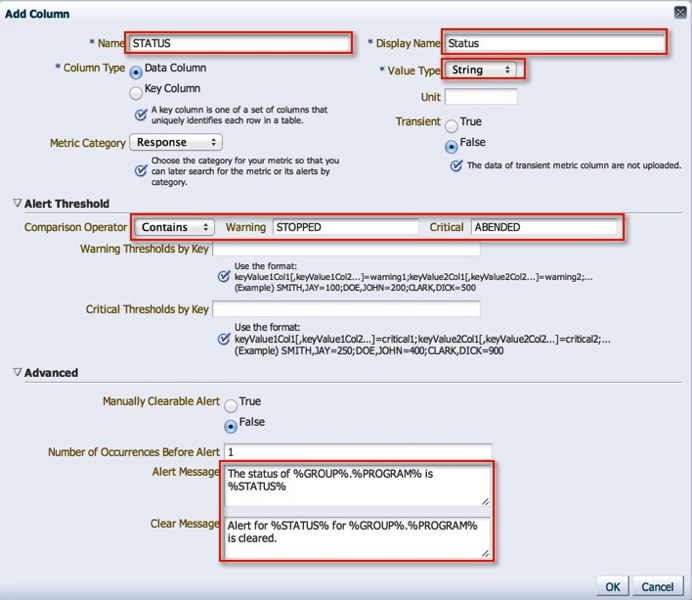
7. Time Since Last Checkpoint is set up in the same manner as the previous column.

8. With that, we are done with the column configuration.

9. I leave the default monitoring credentials in place, however if you are running GoldenGate as user other than the “oracle” user, you will have to either a) create a new monitoring credential set or b) grant the oracle user execute on the monitoring script.

10. We’re coming to the end now. On the next screen, we can actually see this metric in action by running it against a target.

11. Next, we review our settings and save the Metric Extension.
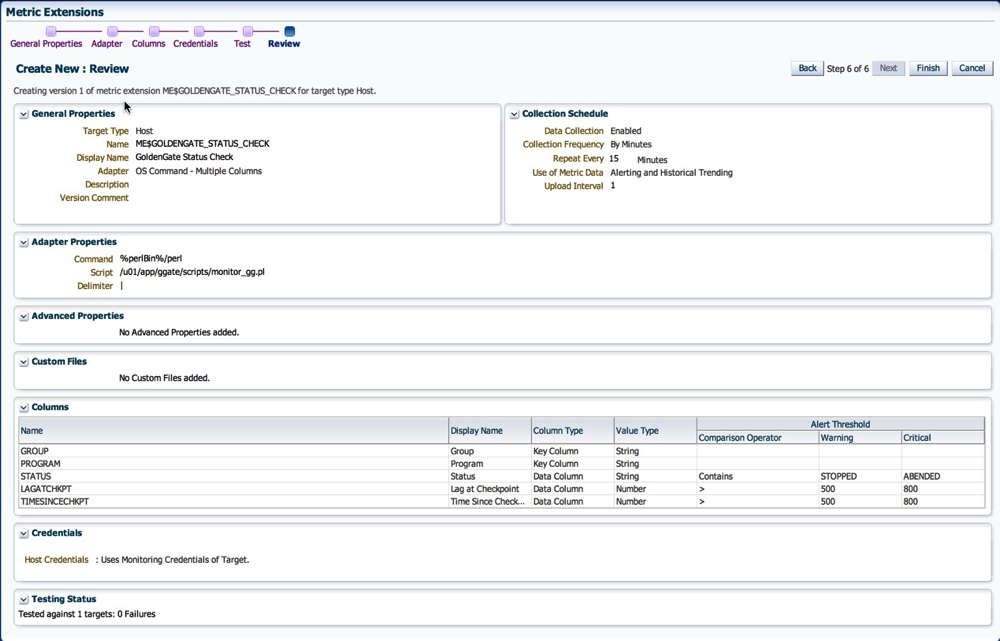
12. Now, back on the ME home page, the metric is in Editable Stage.
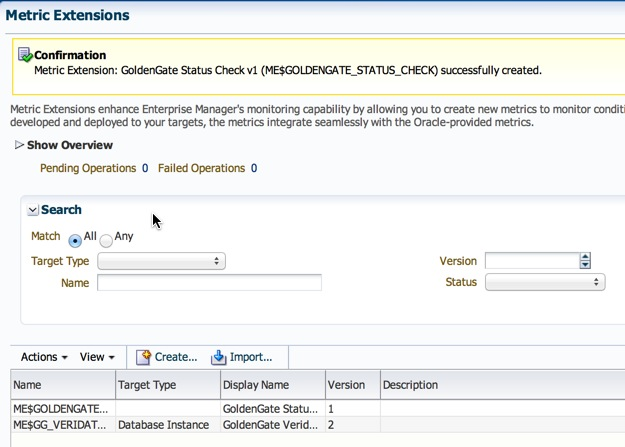
13. We simply need to save it as a “Deployable Draft” or a “Published” extension. The former state allows for deployments to individual targets, where as the latter is required for deployments to Monitoring Templates.

14. Follow steps listed under section 10 on my post on creation of metric extensions to deploy the ME.
Once deployed, the metric is collected at the intervals specified in step 2. Depending on how your incident rule sets are configured, you will most likely start receiving alerting once the thresholds we defined above are crossed.
I do have some lessons learned to add to the above posts from an Incident Management perspective, but that will have to be a completely different post :-)
Hope this helps.
Cheers!
Sunday, March 30, 2014
ggsci: error while loading shared libraries: libnnz11.so: wrong ELF class: ELFCLASS32
I know what some of you might be thinking, is this an Elf Class from Word of Warcraft? Not quite. Coincidentally, when you google imagines for “elf world of warcraft”, you get mostly female ones :)
Over the last couple of weeks, I spent a few hours across several sessions explaining and demonstrating a GoldenGate installation and configuration. The team had provided me two Enterprise Linux servers (source and target) where the oracle database software was already installed as well as database instances running.
The environment configuration was:
Source Server: OEL 4.9 32bit
Source Database: Oracle 11.2.0.4 32bit
GoldenGate Binaries: 11.2.1.0.X 32bit
Target: OEL 6.5 64bit
Target Database: Oracle 11.2.0.4 64bit (I assumed)
GoldenGate Binaries: 11.2.1.0.X 64bit
The GoldenGate (11.2.1.0.X) installation on the source was successful, however, on the target side after I unzipped the GoldenGate binaries and executed ggsci I received the nasty error message below:
-bash-4.1$ ./ggsci
./ggsci: error while loading shared libraries: libnnz11.so: wrong ELF class: ELFCLASS32
Interesting. I was used to received the “error while loading shared libraries” which means that 32bit library file location is not in the LD_LIBRARY_PATH. I was still unable to get GGSCI to work. After a lot of toiling around with .bash_profile settings and looking through various MOS notes, I decided to give it a rest until the next day.
Come the next day, it dawned on me that since I did not setup this target environment, is it possible that my assumption about the 64bit Oracle Database binaries was incorrect? The team I was mentoring had told me that this was a sandbox environment, so it was quite likely that someone installed 32bit Oracle Database binaries.
I checked the banner for the “bad” oracle home.
-bash-4.1$ echo $ORACLE_HOME
/u01/11gr2/app/oracle/product/11.2.0/db_1
-bash-4.1$ echo $ORACLE_SID
test1
-bash-4.1$ sqlplus / as sysdba

SQL*Plus: Release 11.2.0.4.0 Production on Wed Mar 26 20:30:10 2014

Copyright (c) 1982, 2013, Oracle.  All rights reserved.


Connected to:
Oracle Database 11g Enterprise Edition Release 11.2.0.4.0 - Production
With the Partitioning, OLAP, Data Mining and Real Application Testing options

SQL>
Maybe there was something wrong with the installation to begin with, so I Installed a new Oracle 11.2.0.4. Home and checked it’s banner:
-bash-4.1$ echo $ORACLE_HOME
/u01/11gr2/app/oracle/product/11.2.0/db_2
-bash-4.1$ echo $ORACLE_SID
target01
-bash-4.1$ sqlplus / as sysdba

SQL*Plus: Release 11.2.0.4.0 Production on Wed Mar 26 20:30:59 2014

Copyright (c) 1982, 2013, Oracle.  All rights reserved.


Connected to:
Oracle Database 11g Enterprise Edition Release 11.2.0.4.0 - 64bit Production
With the Partitioning, OLAP, Data Mining and Real Application Testing options

SQL>
It wasn’t too surprising that it was exactly the problem. To verify, I started ggsci from the new home and presto it worked!
The point here is, do not take anything for granted. If I had simply gone through my checklist to validate the environment(s), then I could have saved myself a lot of time and effort. And of course, the reason why there were no moss notes directly related to the error message is likely because the support engineers assume that you’ve read the documentation and validated the environment before hand.
Hope this helps.
Cheers.
Wednesday, February 12, 2014
GoldenGate 12.1.2.0 MBeansContainerImpl - Runtime exception starting jAgent Server
During the EM 12.1.0.3.0 configuration to monitor GoldenGate, I stepped through the documentation (as I have numerous times in the past) but this time I kept getting the error message in the jagent.log.
2014-02-12 00:58:54 [main] INFO  JAgentWSMain - About to call initialize on the WebService
2014-02-12 00:58:54 [main] INFO  JAgentWSMain - Loading agent-spring-ws.xml ###############
2014-02-12 00:58:56 [main] INFO  AgentInfoImpl - OEM Enabled ######
2014-02-12 00:58:56 [main] INFO  ManagerFacadeImpl - Metadata initialized
2014-02-12 00:58:56 [main] ERROR MBeansContainerImpl - Runtime exception starting jAgent Server. Jagent Host=localhost, Jagent JMX Port=5559, Jagent Config Dir=./cfg, Monitor Host=localhost, Monitor Port=15000
java.lang.NullPointerException
From my previous experience with the JAgent, I’d had to make many quirky changes in the managers parameter file. For example:
- Rename the parameter file from MGR.prm to mgr.prm
- Remove any comments from the managers parameter file that contain the word “port”
- Remove all comments from the parameter file!
None of those tricks worked because I kept getting the same error message. After the correct search on MOS yielded “OGG 12c JAGENT Fails To Initialize MBeansContainerImpl - Runtime Exception Starting JAgent Server (Doc ID 1598597.1)” suggesting that I add the line below in the Config.properties.
jagent.ssl=false
Due to the default behavior change in GoldenGate 12c (which is not stated), it is recommended that we add the line above for EM12c monitor configuration. Sure enough, once it was added the JAgent started successfully.
2014-02-12 01:04:31 [main] INFO  JAgentWSMain - About to call initialize on the WebService
2014-02-12 01:04:31 [main] INFO  JAgentWSMain - Loading agent-spring-ws.xml ###############
2014-02-12 01:04:33 [main] INFO  AgentInfoImpl - OEM Enabled ######
2014-02-12 01:04:33 [main] INFO  ManagerFacadeImpl - Metadata initialized
2014-02-12 01:04:34 [main] INFO  JAgentRmiJmxFactory - Starting JMX connector server on port 5559
2014-02-12 01:04:34 [main] INFO  JAgentWSMain - JAgent finished initialization.
2014-02-12 01:04:34 [ManagerConnectionKeeper] INFO  ManagerWSApi - Created WSAPI
2014-02-12 01:04:34 [ManagerConnectionKeeper] INFO  MBeansContainerImpl - Start Message Polling Thread...
2014-02-12 01:04:34 [ManagerConnectionKeeper] INFO  MBeansContainerImpl - Start Status Polling Thread...
2014-02-12 01:04:34 [StatusCollector] INFO  ManagerWSApi - Object Id: capture:E_SMAN
2014-02-12 01:04:34 [StatusCollector] INFO  ManagerWSApi - Object Id: agent:MGR
2014-02-12 01:04:34 [StatusCollector] INFO  ManagerWSApi - loadManagerMonitoringPoints Getting Monitoring Points for MGR
2014-02-12 01:04:39 [getInstanceList] INFO  ManagerWSApi - Object Id: capture:E_SMAN
2014-02-12 01:04:39 [getInstanceList] INFO  ManagerWSApi - Object Id: agent:MGR
2014-02-12 01:04:39 [getInstanceList] INFO  ManagerWSApi - loadManagerMonitoringPoints Getting Monitoring Points for MGR
2014-02-12 01:16:51 [MessageCollector] INFO  MessageCollector - Processing message for GGSCI Sequence 218
2014-02-12 01:16:51 [MessageCollector] INFO  MessageCollector - Processing message for GGSCI Sequence 219
2014-02-12 01:16:51 [MessageCollector] INFO  MessageCollector - Flushing messages for MGR
Hope this was helpful.
Cheers!
Saturday, December 14, 2013
OGG-01973 The redo record indicates data loss on object <OBJECT,ID>
Let’s walk through the setup, steps, and error message.
Configuration
A single Extract writing to trail files that are ready by a single Replicat - both on the same host but, with different source and target databases. The E_GG Extract captures transactions from 2 schemas from the SKY database and the replicat R_GG applies them on the target database (WATER).
Steps
1. Check GoldenGate process status
[oracle@blue ggate]$ ggsci

Oracle GoldenGate Command Interpreter for Oracle
Version 11.2.1.0.13 17435036 OGGCORE_11.2.1.0.0OGGBP_PLATFORMS_131002.1206_FBO
Linux, x64, 64bit (optimized), Oracle 11g on Oct 3 2013 02:39:46

Copyright (C) 1995, 2013, Oracle and/or its affiliates. All rights reserved.

GGSCI (blue.color) 1> info all

Program Status Group Lag at Chkpt Time Since Chkpt

MANAGER RUNNING
EXTRACT RUNNING E_GG 00:00:00 00:00:14
REPLICAT RUNNING R_GG 00:25:39 00:23:27
2. All looks good. Create a table on the source schema being replicated.
[oracle@blue ~]$ sqlplus day/oracle

SQL*Plus: Release 11.2.0.3.0 Production on Mon Dec 9 14:05:00 2013

Copyright (c) 1982, 2011, Oracle.  All rights reserved.

Connected to:

Oracle Database 11g Enterprise Edition Release 11.2.0.3.0 - 64bit Production

With the Partitioning, OLAP, Data Mining and Real Application Testing options

SQL> create table breakgg as select * from dba_tables;

Table created.
3. Check the Extracts status. ABENDED?
[oracle@blue ggate]$ ggsci

Oracle GoldenGate Command Interpreter for Oracle
Version 11.2.1.0.13 17435036 OGGCORE_11.2.1.0.0OGGBP_PLATFORMS_131002.1206_FBO
Linux, x64, 64bit (optimized), Oracle 11g on Oct 3 2013 02:42:32

Copyright (C) 1995, 2013, Oracle and/or its affiliates. All rights reserved.

GGSCI (blue.color) 1> info all

Program Status Group Lag at Chkpt Time Since Chkpt

MANAGER RUNNING
EXTRACT ABENDED E_GG 00:00:00 00:00:14
REPLICAT RUNNING R_GG 00:28:39 00:25:27
4. What does the report file tell us?
Source Context :
SourceModule : [er.redo.ora.sr]
SourceID : [/scratch/aime1/adestore/views/aime1_adc4150267/oggcore/OpenSys/src/app/er/redo/oracle/redoorasr.c]
SourceFunction : [get_subrec]
SourceLine : [6377]
ThreadBacktrace : [11] elements
: [/u01/app/ggate/libgglog.so(CMessageContext::AddThreadContext()+0x1e) [0x7ffdba940f3e]]
: [/u01/app/ggate/libgglog.so(CMessageFactory::CreateMessage(CSourceContext*, unsigned int, ...)+0x2cc) [0x7ffdba939c8c]]
: [/u01/app/ggate/libgglog.so(_MSG_ERR_ORACLE_REDO_DATA_LOSS(CSourceContext*, unsigned int, CMessageFactory::MessageDisposition)
+0x2f) [0x7ffdba9185f1]]
: [/u01/app/ggate/extract() [0x701d69]]
: [/u01/app/ggate/extract(REDOORASR_get_all_subrecs(int, objectpool*, unsigned char*, subrec_info_t*, redo_thread_t*, log_contex
t_t*)+0x6c) [0x701e8c]]
: [/u01/app/ggate/extract(REDO_read(char*, int*, long*, char*, short*, int, char*)+0x7e4) [0x6a4308]]
: [/u01/app/ggate/extract(READ_EXTRACT_RECORD(chkpt_context_t*, short, char*, __std_rec_hdr*, int*, int*, long*, short, short, c
har*, short*, char*, short*, long*, char*)+0x19b) [0x4f9bbb]]
: [/u01/app/ggate/extract(process_extract_loop()+0x625) [0x565975]]
: [/u01/app/ggate/extract(main+0x5e6) [0x578166]]
: [/lib64/libc.so.6(__libc_start_main+0xfd) [0x3d1e41ed1d]]
: [/u01/app/ggate/extract(__gxx_personality_v0+0x3a2) [0x4f18ba]]

2013-12-09 14:05:30 ERROR OGG-01973 The redo record indicates data loss on object 68,687.

***********************************************************************
* ** Run Time Statistics ** *
***********************************************************************


Report at 2013-12-09 14:05:30 (activity since 2013-12-09 13:41:25)

Output to ./dirdat/lt:


DDL replication statistics:

Operations: 0
Mapped operations: 0
Unmapped operations: 0
Other operations: 0
Excluded operations: 0


No records extracted.


2013-12-09 14:05:30 ERROR OGG-01668 PROCESS ABENDING.
5. OGG-01973? Well, this just raises too many questions. A quick search on MOS yields only a single note “OGG v11.2 Extract amends with “OGG-01965 The redo record indicates data loss on object <object id>” or "OGG-01973 The redo record indicates data loss on object <object id>" (Doc ID 1483431.1)". In it, there’s a note that the table can not be in NOLOGGING mode. But wait, this a new table and by default LOGGING is turned on.
6. What was I missing? I looked through the report file again, and found this message.
2013-12-09 13:41:25  WARNING OGG-01970  Database is not in archiving mode. Extract may be forced to fetch LONG columns and may miss transaction data if th

e online logs are recycled.

2013-12-09 13:41:25  WARNING OGG-01972  Extract will fetch all LONG columns because archiving mode is disabled.

2013-12-09 13:41:25  WARNING OGG-01423  No valid default archive log destination directory found for thread 1.
7. Ok, is archived logging turned on? Ouch, that is probably it!
SQL> archive log list

Database log mode      No Archive Mode

Automatic archival      Disabled

Archive destination      USE_DB_RECOVERY_FILE_DEST

Oldest online log sequence     52

Current log sequence      54
8. Okay, lets turn it on.
SQL> shutdown immediate

Database closed.

Database dismounted.

ORACLE instance shut down.

SQL> startup mount;

ORACLE instance started.


Total System Global Area  814227456 bytes

Fixed Size   2232760 bytes

Variable Size 297799240 bytes

Database Buffers 511705088 bytes

Redo Buffers   2490368 bytes

Database mounted.

SQL> alter database archivelog;

Database altered.

SQL> alter database open;

Database altered.
9. And try to create the table again. By the way, I was not able to skip the particular transaction in the Extract, and the only way around it (for the moment) was a rebuild of the extract and pump.
10. Once I did that, along with enabling archive log mode, DDL replication worked as expected!
In conclusion, follow the steps to pre-requisite checks to the letter i.e. database must have minimum supplemental logging enabled, check point table etc. Otherwise, you are simply inviting trouble! RTM my friends :) I hope you found this post helpful. I’ll have to spend more time to figure out how to skip a “bad” transaction in the Extract and blog about it at a later date.
Cheers!
Thursday, December 5, 2013
Adding Tables to an Existing GoldenGate Configuration with Transaction Integrity


[oracle@blue ggate]$ ggsci

Oracle GoldenGate Command Interpreter for Oracle
Version 11.2.1.0.13 17435036 OGGCORE_11.2.1.0.0OGGBP_PLATFORMS_131002.1206_FBO
Linux, x64, 64bit (optimized), Oracle 11g on Oct  3 2013 02:39:46

Copyright (C) 1995, 2013, Oracle and/or its affiliates. All rights reserved.


GGSCI (blue.color) 2> dblogin userid ggate, password ggate
Successfully logged into database.
GGSCI (blue.color) 3> add trandata song.stone

2013-12-05 15:17:07  WARNING OGG-00869  No unique key is defined for table 'STONE'. All viable columns will be used to represent the key, but may not guarantee uniqueness.  KEYCOLS may be used to define the key.

Logging of supplemental redo data enabled for table SONG.STONE.

GGSCI (blue.color) 4> add trandata song.greystreet

2013-12-05 15:17:15  WARNING OGG-00869  No unique key is defined for table 'GREYSTREET'. All viable columns will be used to represent the key, but may not guarantee uniqueness.  KEYCOLS may be used to define the key.

Logging of supplemental redo data enabled for table SONG.GREYSTREET.
GGSCI (blue.color) 5> edit params e_gg
...
TABLE song.stone;
TABLE song.greystreet;
...
GGSCI (blue.color) 2> stop e_gg

Sending STOP request to EXTRACT E_GG ...
Request processed.


GGSCI (blue.color) 3> start e_gg

Sending START request to MANAGER ...
EXTRACT E_GG starting
[oracle@blue ggate]$ sqlplus / as sysdba

SQL*Plus: Release 11.2.0.3.0 Production on Thu Dec 5 15:28:31 2013

Copyright (c) 1982, 2011, Oracle.  All rights reserved.


Connected to:
Oracle Database 11g Enterprise Edition Release 11.2.0.3.0 - 64bit Production
With the Partitioning, OLAP, Data Mining and Real Application Testing options

SQL> select current_scn from v$database;

CURRENT_SCN
-----------
    1113396

SQL> exit
Disconnected from Oracle Database 11g Enterprise Edition Release 11.2.0.3.0 - 64bit Production
With the Partitioning, OLAP, Data Mining and Real Application Testing options
[oracle@blue ggate]$ expdp system/oracle directory=data_pump_dir dumpfile=additional_tables.dmp flashback_scn=1113396 tables=song.stone,song.greystreet

Export: Release 11.2.0.3.0 - Production on Thu Dec 5 15:32:04 2013

Copyright (c) 1982, 2011, Oracle and/or its affiliates.  All rights reserved.

Connected to: Oracle Database 11g Enterprise Edition Release 11.2.0.3.0 - 64bit Production
With the Partitioning, OLAP, Data Mining and Real Application Testing options
Starting "SYSTEM"."SYS_EXPORT_TABLE_01":  system/******** directory=data_pump_dir dumpfile=additional_tables.dmp flashback_scn=1113396 tables=song.stone,song.greystreet
Estimate in progress using BLOCKS method...
Processing object type TABLE_EXPORT/TABLE/TABLE_DATA
Total estimation using BLOCKS method: 128 KB
Processing object type TABLE_EXPORT/TABLE/TABLE
Processing object type TABLE_EXPORT/TABLE/CONSTRAINT/CONSTRAINT
. . exported "SONG"."GREYSTREET"                         5.882 KB     100 rows
. . exported "SONG"."STONE"                              5.679 KB     100 rows
Master table "SYSTEM"."SYS_EXPORT_TABLE_01" successfully loaded/unloaded
******************************************************************************
Dump file set for SYSTEM.SYS_EXPORT_TABLE_01 is:
  /u01/app/oracle/admin/sky/dpdump/additional_tables.dmp
Job "SYSTEM"."SYS_EXPORT_TABLE_01" successfully completed at 15:32:14
[oracle@blue ggate]$ impdp system/oracle directory=data_pump_dir dumpfile=additional_tables.dmp remap_schema=song:river

Import: Release 11.2.0.3.0 - Production on Thu Dec 5 15:45:29 2013

Copyright (c) 1982, 2011, Oracle and/or its affiliates.  All rights reserved.

Connected to: Oracle Database 11g Enterprise Edition Release 11.2.0.3.0 - 64bit Production
With the Partitioning, OLAP, Data Mining and Real Application Testing options
Master table "SYSTEM"."SYS_IMPORT_FULL_01" successfully loaded/unloaded
Starting "SYSTEM"."SYS_IMPORT_FULL_01":  system/******** directory=data_pump_dir dumpfile=additional_tables.dmp remap_schema=song:river
Processing object type TABLE_EXPORT/TABLE/TABLE
Processing object type TABLE_EXPORT/TABLE/TABLE_DATA
. . imported "RIVER"."GREYSTREET"                        5.882 KB     100 rows
. . imported "RIVER"."STONE"                             5.679 KB     100 rows
Processing object type TABLE_EXPORT/TABLE/CONSTRAINT/CONSTRAINT
Job "SYSTEM"."SYS_IMPORT_FULL_01" successfully completed at 15:45:31
GGSCI (blue.color) 2> edit params r_gg
...
MAP song.stone, TARGET river.stone , FILTER ( @GETENV("TRANSACTION", "CSN") > 1113396);
MAP song.greystreet, TARGET river.greystreet, FILTER ( @GETENV("TRANSACTION", "CSN") > 1113396);
...
GGSCI (blue.color) 4>  stop r_gg

Sending STOP request to REPLICAT R_GG ...
start Request processed.


GGSCI (blue.color) 5> start r_gg

Sending START request to MANAGER ...
REPLICAT R_GG starting

GGSCI (blue.color) 6> info all

Program     Status      Group       Lag at Chkpt  Time Since Chkpt

MANAGER     RUNNING
EXTRACT     RUNNING     E_GG        00:00:00      00:00:09
REPLICAT    RUNNING     R_GG        00:00:00      00:00:03
SQL> select name from v$database;

NAME
---------
SKY

SQL> select count(1) from song.stone;

  COUNT(1)
----------
       100
SQL> select name from v$database;

NAME
---------
WATER

SQL> select count(1) from river.stone;

  COUNT(1)
----------
       100
SQL> INSERT INTO song.stone
SELECT dbms_random.string('A', 2) RNDMSTR
  FROM all_objects
 WHERE ROWNUM;

100 rows created.

SQL> commit;

Commit complete.

SQL> select count(1) from song.stone;

  COUNT(1)
----------
       200
SQL> select count(1) from river.stone;

  COUNT(1)
----------
       200
GGSCI (blue.color) 1> info all

Program     Status      Group       Lag at Chkpt  Time Since Chkpt

MANAGER     RUNNING
EXTRACT     RUNNING     E_GG        00:00:00      00:00:02
REPLICAT    RUNNING     R_GG        00:00:00      00:00:08
GGSCI (blue.color) 2> edit params r_gg
...
MAP song.stone, TARGET river.stone;
MAP song.greystreet, TARGET river.greystreet;
...
GGSCI (blue.color) 4>  stop r_gg

Sending STOP request to REPLICAT R_GG ...
start Request processed.


GGSCI (blue.color) 5> start r_gg

Sending START request to MANAGER ...
REPLICAT R_GG starting

GGSCI (blue.color) 6> info all

Program     Status      Group       Lag at Chkpt  Time Since Chkpt

MANAGER     RUNNING
EXTRACT     RUNNING     E_GG        00:00:00      00:00:06
REPLICAT    RUNNING     R_GG        00:00:00      00:00:02
Update Dec 15, 2013: I had shared this note with an Engineer @ Oracle who actually converted this into a MOS Note! I'm excited!!
How to add tables to an Existing GoldenGate Configuration with Transaction Integrity? (Doc ID 1607591.1)
GoldenGate 12.1.2.0 Install/Upgrade on OEL 6.4 x86-64
My current install is OGG 11.2.1.0.13 on Linux 64bit running against an 11.2.0.3 databases.
Vamanos!
Installation
[oracle@blue gg12c]$ ls -lhtr
total 578M
-rwxrwx--- 1 root vboxsf 326M Dec  5 15:03 121200_fbo_ggs_Linux_x64_shiphome.zip
-rwxrwx--- 1 root vboxsf 253M Dec  5 18:13 ggate.1121013.tgz
[oracle@blue gg12c]$ unzip 121200_fbo_ggs_Linux_x64_shiphome.zip
[oracle@blue gg12c]$ ls -lhtr
total 579M
drwxrwx--- 1 root vboxsf  102 Sep 25 05:59 fbo_ggs_Linux_x64_shiphome
-rwxrwx--- 1 root vboxsf 276K Oct  6 18:04 OGG_WinUnix_Rel_Notes_12.1.2.0.0.pdf
-rwxrwx--- 1 root vboxsf  92K Oct  6 18:04 Oracle-GoldenGate-12.1.2.0-README.doc
-rwxrwx--- 1 root vboxsf 141K Oct  6 18:04 OGG_WinUnix_Rel_Notes_12.1.2.0.0.doc
-rwxrwx--- 1 root vboxsf  23K Oct  6 18:04 Oracle-GoldenGate-12.1.2.0-README.txt
-rwxrwx--- 1 root vboxsf 326M Dec  5 15:03 121200_fbo_ggs_Linux_x64_shiphome.zip
-rwxrwx--- 1 root vboxsf 253M Dec  5 18:13 ggate.1121013.tgz
[oracle@blue gg12c]$ cd fbo_ggs_Linux_x64_shiphome/
[oracle@blue fbo_ggs_Linux_x64_shiphome]$ ls -lhtr
total 0
drwxrwx--- 1 root vboxsf 204 Sep 25 05:59 Disk1
[oracle@blue fbo_ggs_Linux_x64_shiphome]$ cd Disk1/
[oracle@blue Disk1]$ ls -lhtr
total 4.0K
drwxrwx--- 1 root vboxsf 374 Sep 25 05:59 install
drwxrwx--- 1 root vboxsf 714 Sep 25 05:59 stage
-rwxrwx--- 1 root vboxsf 918 Sep 25 05:59 runInstaller
drwxrwx--- 1 root vboxsf 102 Sep 25 05:59 response
[oracle@blue Disk1]$ ./runInstaller
Starting Oracle Universal Installer...

Checking Temp space: must be greater than 120 MB.   Actual 74181 MB    Passed
Checking swap space: must be greater than 150 MB.   Actual 8015 MB    Passed
Checking monitor: must be configured to display at least 256 colors.    Actual 16777216    Passed
Preparing to launch Oracle Universal Installer from /tmp/OraInstall2013-12-05_06-14-19PM. Please wait ...


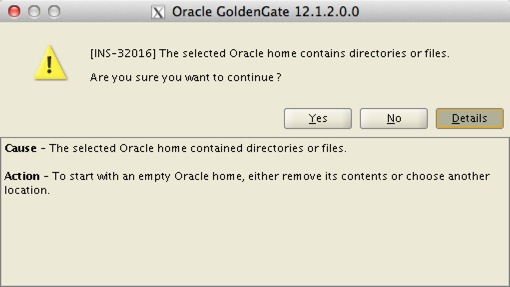
4. Click “yes” on this prompt. I think I know what I am doing!


Upgrade
8. Review the installation, and validate the binaries startup successfully.
[oracle@blue]$ pwd
/u01/app/ggate
[oracle@blue ggate]$ ./ggsci

Oracle GoldenGate Command Interpreter for Oracle
Version 12.1.2.0.0 17185003 OGGCORE_12.1.2.0.0_PLATFORMS_130924.1316_FBO
Linux, x64, 64bit (optimized), Oracle 11g on Sep 25 2013 00:31:13
Operating system character set identified as UTF-8.

Copyright (C) 1995, 2013, Oracle and/or its affiliates. All rights reserved.

GGSCI (blue.color) 1> info all

Program     Status      Group       Lag at Chkpt  Time Since Chkpt

MANAGER     RUNNING
EXTRACT     STOPPED     E_GG        00:00:00      00:37:10
REPLICAT    STOPPED     R_GG        00:00:00      00:37:10
GGSCI (blue.color) 2> dblogin userid ggate, password ggate
Successfully logged into database.

GGSCI (blue.color) 5> upgrade checkpointtable

No checkpoint table specified. Using GLOBALS specification (ggate.checkpoint)...

Successfully upgraded checkpoint table ggate.checkpoint.
GGSCI (blue.color) 2> start e_gg

Sending START request to MANAGER ...
EXTRACT E_GG starting

GGSCI (blue.color) 3> info all

Program     Status      Group       Lag at Chkpt  Time Since Chkpt

MANAGER     RUNNING
EXTRACT     ABENDED     E_GG        00:00:00      00:38:40
REPLICAT    STOPPED     R_GG        00:00:00      00:38:40
2013-12-05 21:40:13 ERROR OGG-01416 File ./dirdat/lt000005, with format RELEASE 11.2, does not match current format specification of RELEASE 12.1. Modify the parameter file to specify format RELEASE 11.2 or issue ETROLLOVER prior to restart.
Modify the parameter file to specify format RELEASE 11.2 or issue ETROLLOVER prior to restart.
12.1. Option #1: Let’s make the correct parameter change and try again. Add the following to the EXTTRAIL ./dirdat/lt in the extracts parameter file.
EXTTRAIL ./dirdat/lt, FORMAT RELEASE 11.2
GGSCI> alter extract e_gg etrollover12.2.1. Starting it again!
GGSCI (blue.color) 6> start e_gg

Sending START request to MANAGER ...
EXTRACT E_GG starting

GGSCI (blue.color) 7> info all

Program     Status      Group       Lag at Chkpt  Time Since Chkpt

MANAGER     RUNNING
EXTRACT     RUNNING     E_GG        00:00:00      00:00:04
REPLICAT    STOPPED     R_GG        00:00:00      00:54:46
GGSCI (blue.color) 13> start r_gg

Sending START request to MANAGER ...
REPLICAT R_GG starting

GGSCI (blue.color) 14> info all

Program     Status      Group       Lag at Chkpt  Time Since Chkpt

MANAGER     RUNNING
EXTRACT     RUNNING     E_GG        00:00:00      00:00:04
REPLICAT    RUNNING     R_GG        00:00:00      00:00:01
Cheers!
GoldenGate Veridata 11.2.1 Agent Installation
Components:
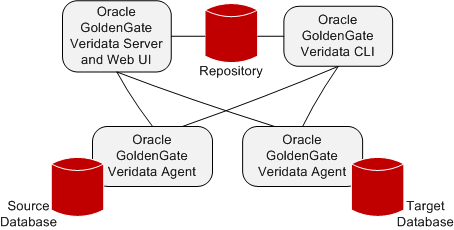
For this example, I will install the Java based agent.
Installation
1. Create the Tablespace, User, and Grant Privileges.
SQL> create tablespace ggate_data datafile '/u003/oradata/gvddvs01/ggate_ata.dbf' size 500m autoextend on;
2. Create directories
greed101:(oracle) [green] $ echo $ORACLE_HOME
3. Unzip Binaries
greed101:(oracle) [green] $ ls -ltr
4. Create a copy of the agent.properties.sample file as agent.properties and edit the files highlighted.
# Copyright (c) 2011, 2012, Oracle and/or its affiliates. All rights reserved.
5. Set the JRE_HOME or JAVA_HOME parameter, and start the agent.
greed101:(oracle) [green] $ ./agent.sh start
6. Check the agent run log
greed101:(oracle) [green] $ ./agent.sh run
7. Check the log for messages
greed101:(oracle) [green] $ cat /u001/app/oracle/product/veridata/agent/veridata-agent.log
Tuesday, November 26, 2013
GoldenGate Veridata 11.2.1 Server Installation
Veridata is Oracle’s answer to Data Validation for environments where a replication technology is utilized. In other words, the tool is agnostic (but partial) to a set Database vendors. You can install it on a variety of platforms, and a few database types.
Components:
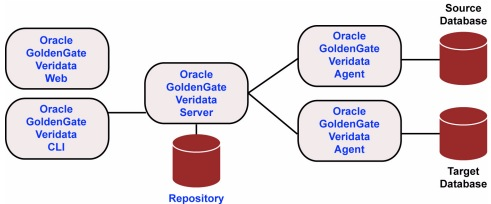
Installation
1. Download and unzip the media from eDelivery.
2. Invoke the bash script to start the installer.
3. Click “Next”.
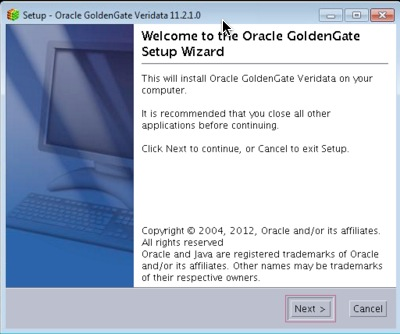
4. Pick your installation directory and click “Next”.
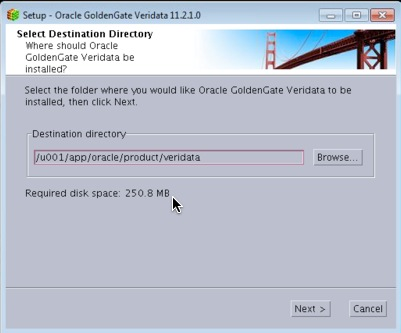
5. On the ports section, click “Next”.
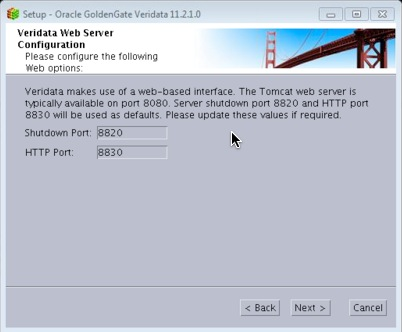
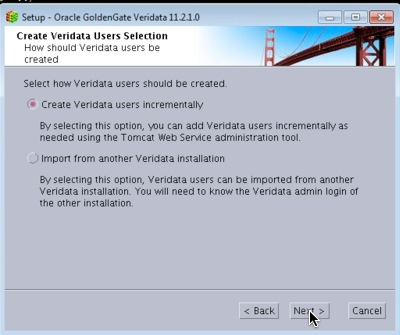
6. Leave the defaults and click “Next”.
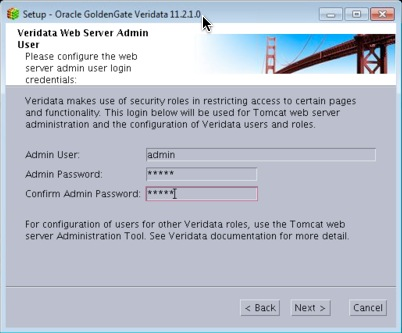
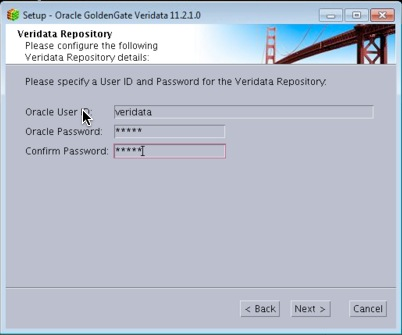
7. Enter at the account username and password. This will be used to install the tables in the repository database.
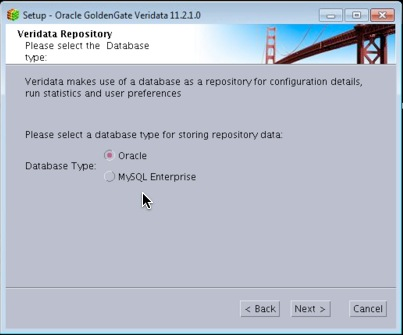
8. Of course we will chose “Oracle” :)
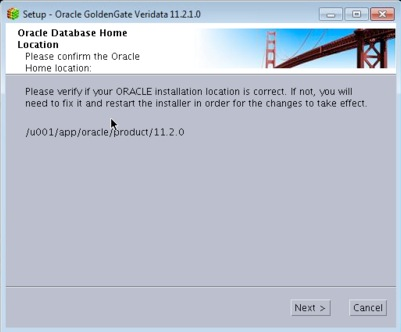
9. Confirm the Oracle Home (Veridata Home) location.
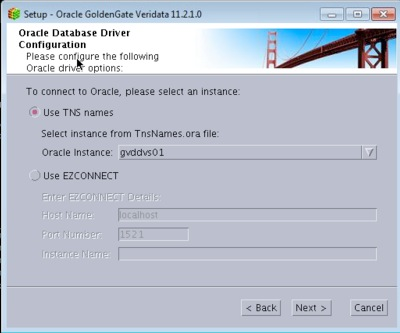
10. Select and Instance and click Continue. This article assumes that the Veridata installation is on the same server as its intended repository.
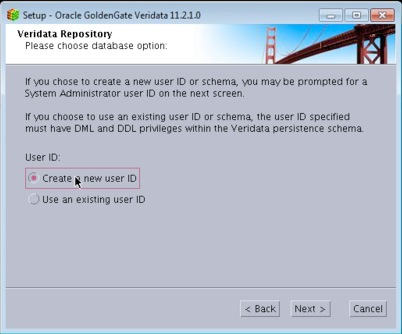
11. I will let the installer create a new user for me.
12. Enter the DBA
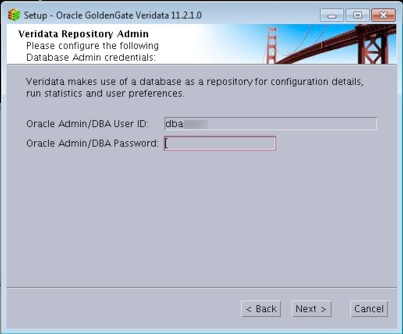
13. On the next screen, enter the oracle database user where the Veridata objects will be installed.
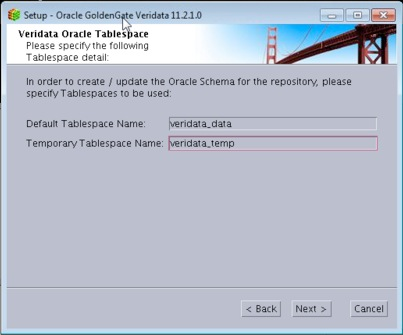
14. Enter the default, and temp tablespace for the above user.
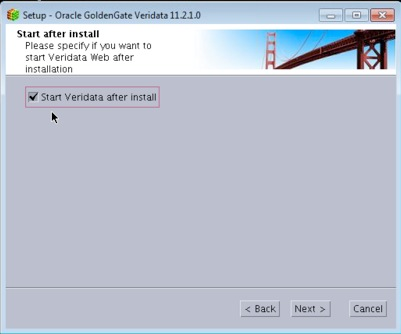
15. Check the box if you want it to start Veridata after the installation.
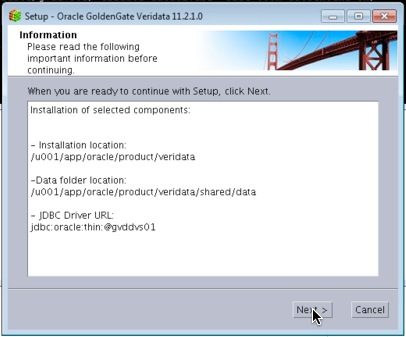
16. Review the settings and click “Next”.
17. Progress is always good.
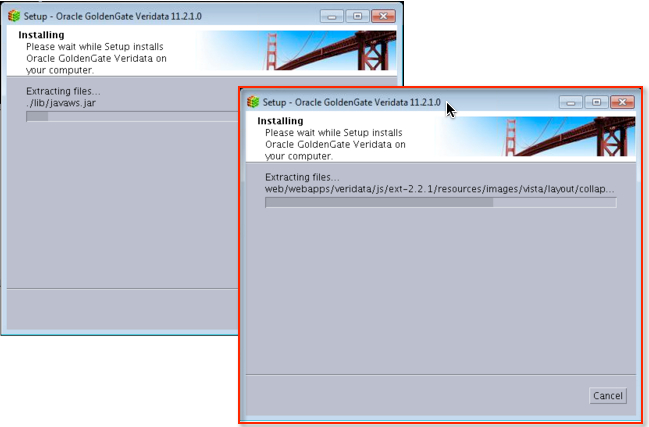
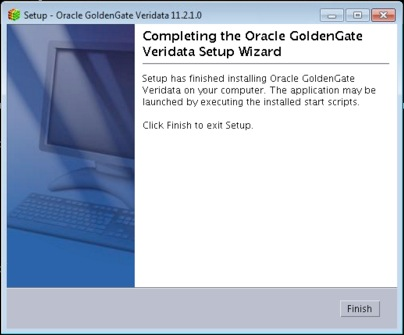
18. Awesome! All done.
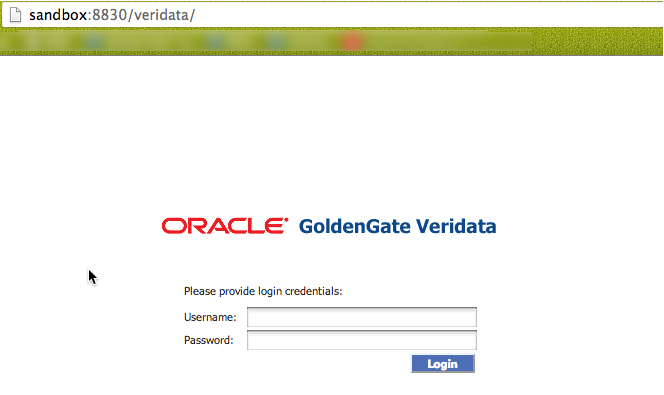
At this point, we can log into the Veridata Server successfully!
In subsequent posts, I will discuss the other aspects such as the Veridata Agent install, Configuration, etc.
Cheers!
Sunday, October 20, 2013
Oracle Golden Gate 12.1.2

http://docs.oracle.com/goldengate/1212/gg-winux/index.html
Cheers!
Tuesday, September 10, 2013
RMAN-08120 on Primary with Active Standby and GoldenGate
RMAN-08120: WARNING: archived log not deleted, not yet applied by standby
RMAN> BACKUP ARCHIVELOG UNTIL TIME '' NOT BACKED UP 1 TIMES TO DEVICE TYPE SBT;
RMAN> DELETE ARCHIVELOG SEQUENCE 12206 BACKED UP 1 TIMES TO DEVICE TYPE DISK;
SQL> select capture_name, queue_owner, capture_user, start_scn, status from dba_capture;

CAPTURE_NAME     QUEUE_OWNER      CAPTURE_USER     START_SCN STATUS
------------     ------------- ----------       --------- ------
OGG$CAP_E_PRD    GGATE         GGATE            525864662 ENABLED
SQL> exec DBMS_CAPTURE_ADM.DROP_CAPTURE ('OGG$CAP_E_PRD');
BEGIN DBMS_CAPTURE_ADM.DROP_CAPTURE ('OGG$CAP_E_PRD'); END;

*
ERROR at line 1:
ORA-01338: Other process is attached to LogMiner session
ORA-06512: at "SYS.DBMS_CAPTURE_ADM_INTERNAL", line 726
ORA-06512: at "SYS.DBMS_CAPTURE_ADM_INTERNAL", line 697
ORA-06512: at "SYS.DBMS_CAPTURE_ADM", line 566
ORA-06512: at line 1
SQL> exec dbms_capture_adm.STOP_capture(CAPTURE_NAME=>'OGG$CAP_E_PRD')

PL/SQL procedure successfully completed.
SQL> select capture_name, queue_owner, capture_user, start_scn, status from dba_capture;

CAPTURE_NAME     QUEUE_OWNER      CAPTURE_USER     START_SCN STATUS
------------     ------------- ----------       --------- ------
OGG$CAP_E_PRD    GGATE         GGATE            525864662 DISABLED
SQL> exec DBMS_CAPTURE_ADM.DROP_CAPTURE ('OGG$CAP_E_PRD');

PL/SQL procedure successfully completed.
SQL> select capture_name, queue_owner, capture_user, start_scn, status from dba_capture;

no rows selected
Friday, August 2, 2013
An Alternative to Oracle Enterprise Managers GoldenGate Plugin
I can't tell you how many times I've been burned by it when using it for OEM monitoring. The symptoms, if you care to read, include:
- Hanging Extract and Pumps
- BDB datastore corruptions
After banging my head against the wall with MOS, who told me that they're getting a lot reports from customers regarding JAGENTs, I decided to take things into my own hands. Fortunately, I am savvy enough with OEM and its Metric Extension architecture to build my own "plugin".
As a disclaimer to all perl guru's, the attached script is my first attempt at writing in the language. I consider myself quite humle and wide open to improvements and suggestions.
If you're like me, then you want to consolidate your work into concise folder. I chose the GoldenGate installation directory.
Copy monitor_gg.pl and ggsci_syntax.txt into this directory.
The key parameters to consider are at the beginning of the script.
Reset the directory variables to your respective environment (by the way, the script works on Windows as well as long as you point it to perl binaries).
Give it a test to make sure that it works. My output looks is the following:
It is concatenating the strings to represet the current object type, status, lag at checkpoint (seconds), and time since last check point (seconds) values.
Here on, you simply need to create a Metric Extension (for a Host Target Type) within OEM and configure your incident rule sets accordingly. If I had more time, I would show you how I set up mine but I didn't capture any screenshots. The documentation for it pretty straightforward and the GUI itself is intuitive.
On my "All Metrics" for the host, I see the following:

There's plenty to improve on in the script. Since I have an active ticket with Oracle Support, unless they come back with a solution quickly, I will continue to improve on the attached script.
Hope this was helpful for at least some of you :)