Tuesday, March 18, 2014
Create a Standby Database using EM12c
I wanted to make this a quick post, because a friend was mentioning a slight problem during a manual set up of Data Guard. I told him you could do it through EM, and then recalled that I had documented it a while back. After the tube light finally went on in my head, it occurred to me that this would a good post.
When leveraging EM to set up, monitor, and manage (Active) Data Guard, Data Guard Broker is configured by default. A quote from Oracle Docs:
"Oracle Data Guard ensures high availability, data protection, and disaster recovery for enterprise data. Data Guard provides a comprehensive set of services that create, maintain, manage, and monitor one or more standby databases to enable production Oracle databases to survive disasters and data corruptions. Data Guard maintains these standby databases as transactionally consistent copies of the primary database. If the primary database becomes unavailable because of a planned or an unplanned outage, Data Guard can switch any standby database to the production role, thus minimizing the downtime associated with the outage. Data Guard can be used with traditional backup, recovery, and cluster techniques, as well as the Flashback Database feature to provide a high level of data protection and data availability.”
Whether or not you chose to set up a different network/listener for the Data Guard traffic is entirely your choice (and a good one in my opinion). However, in this scenario, I simply used the default parameters to illustrate a point.
1. Navigate to the particular database’s home page.


2.On the database home page, click on “Avaliability”->”Add Standby Database”.

3. On the next screen, click the first radio button and “Continue”. We will create a new “Physical Standby” database.
I will explore this section further after Data Guard is setup.

4. We can leverage the Duplicate from Active Database feature in 11g, therefore, leave default values and click “Continue”.
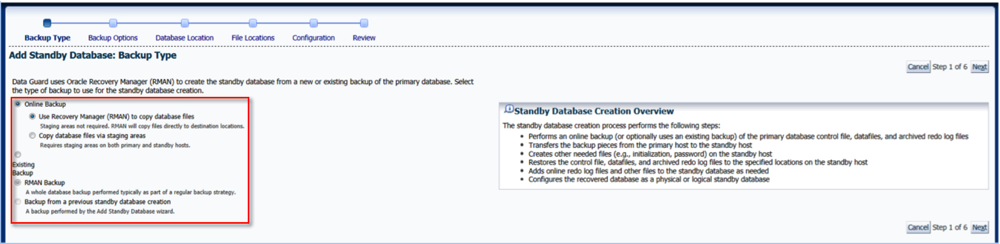
5. Either create a new credential set or use an existing one.
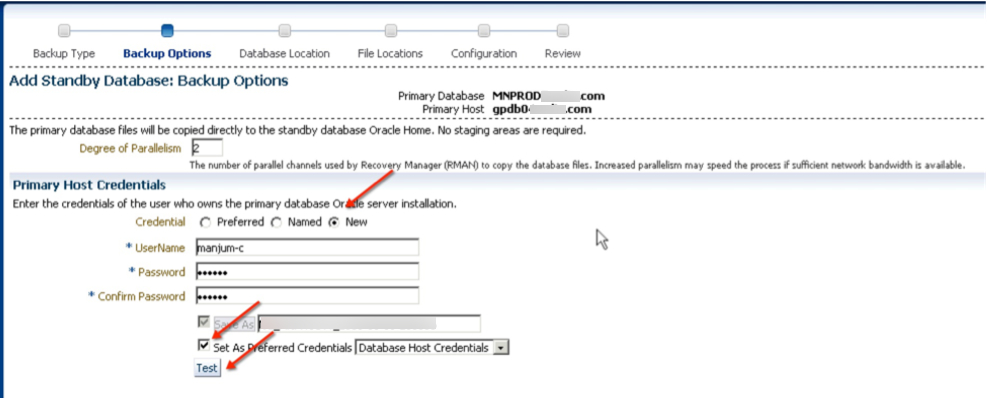
6. Next, we select which host the standby instance will be created on.

7. At this point, we can chose the relevant file locations. You have the option to change them compared to the primary database if needed.
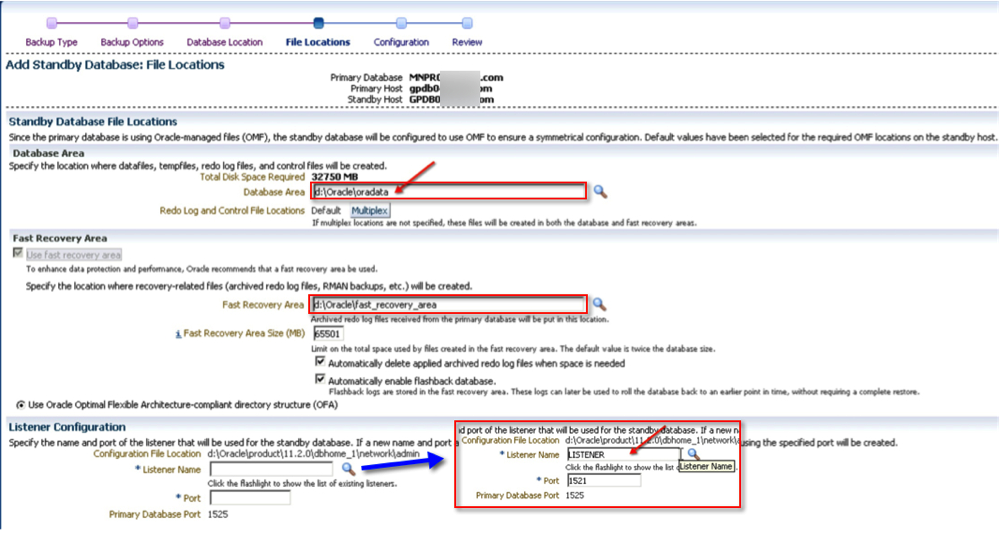
8. Time to give the new guy a name. You could optionally decide to monitor it as well (a good idea in my opinion). Should you also want to use a different connect net services identifier other than what EM uses, now is a good time to do that.

9. Finally, review your settings and click “Finish”.

10. As with most “tasks” in EM, a job is submitted which can be reviewed.

10.1 Job details.

One complete, the new standby database is configured and ready! In addition to EM, you can also verify the status via Data Guard Brokers interface. By the way, the output below is from a different system.
[oracle@server01 ~]$ dgmgrl /
DGMGRL for Linux: Version 11.2.0.3.0 - 64bit Production

Copyright (c) 2000, 2009, Oracle. All rights reserved.

Welcome to DGMGRL, type "help" for information.
Connected.
DGMGRL> show configuration

Configuration - prim_db.global.name

  Protection Mode: MaxPerformance
  Databases:
    prim_db   - Primary database
    stand_db - Physical standby database

Fast-Start Failover: DISABLED

Configuration Status:
SUCCESS

DGMGRL>
The funny thing about Data Guard, at least from my experience, is that there’s no two same configurations. For some reason or the other, usually related to network configuration, or one-off requirements which cause the difference. If you follow the steps above, then at the very least you will have a standardized way to deploy standby databases.
Hope this helps!
Cheers.
Tuesday, September 10, 2013
RMAN-08120 on Primary with Active Standby and GoldenGate
RMAN-08120: WARNING: archived log not deleted, not yet applied by standby
RMAN> BACKUP ARCHIVELOG UNTIL TIME '' NOT BACKED UP 1 TIMES TO DEVICE TYPE SBT;
RMAN> DELETE ARCHIVELOG SEQUENCE 12206 BACKED UP 1 TIMES TO DEVICE TYPE DISK;
SQL> select capture_name, queue_owner, capture_user, start_scn, status from dba_capture;

CAPTURE_NAME     QUEUE_OWNER      CAPTURE_USER     START_SCN STATUS
------------     ------------- ----------       --------- ------
OGG$CAP_E_PRD    GGATE         GGATE            525864662 ENABLED
SQL> exec DBMS_CAPTURE_ADM.DROP_CAPTURE ('OGG$CAP_E_PRD');
BEGIN DBMS_CAPTURE_ADM.DROP_CAPTURE ('OGG$CAP_E_PRD'); END;

*
ERROR at line 1:
ORA-01338: Other process is attached to LogMiner session
ORA-06512: at "SYS.DBMS_CAPTURE_ADM_INTERNAL", line 726
ORA-06512: at "SYS.DBMS_CAPTURE_ADM_INTERNAL", line 697
ORA-06512: at "SYS.DBMS_CAPTURE_ADM", line 566
ORA-06512: at line 1
SQL> exec dbms_capture_adm.STOP_capture(CAPTURE_NAME=>'OGG$CAP_E_PRD')

PL/SQL procedure successfully completed.
SQL> select capture_name, queue_owner, capture_user, start_scn, status from dba_capture;

CAPTURE_NAME     QUEUE_OWNER      CAPTURE_USER     START_SCN STATUS
------------     ------------- ----------       --------- ------
OGG$CAP_E_PRD    GGATE         GGATE            525864662 DISABLED
SQL> exec DBMS_CAPTURE_ADM.DROP_CAPTURE ('OGG$CAP_E_PRD');

PL/SQL procedure successfully completed.
SQL> select capture_name, queue_owner, capture_user, start_scn, status from dba_capture;

no rows selected