Showing posts with label Upgrade. Show all posts
Showing posts with label Upgrade. Show all posts
Thursday, December 5, 2013
GoldenGate 12.1.2.0 Install/Upgrade on OEL 6.4 x86-64
It was about time that I started working with the new release. I’ve had to upgrade my current 11g install, and since I’m on a documentation high these days, I put something together to help anyone else who wants to go through the install.
My current install is OGG 11.2.1.0.13 on Linux 64bit running against an 11.2.0.3 databases.
My current install is OGG 11.2.1.0.13 on Linux 64bit running against an 11.2.0.3 databases.
Vamanos!
Installation
1. Make a copy of your existing GoldenGate install folder after stopping all processes.
[oracle@blue gg12c]$ ls -lhtr
total 578M
-rwxrwx--- 1 root vboxsf 326M Dec  5 15:03 121200_fbo_ggs_Linux_x64_shiphome.zip
-rwxrwx--- 1 root vboxsf 253M Dec  5 18:13 ggate.1121013.tgz
[oracle@blue gg12c]$ unzip 121200_fbo_ggs_Linux_x64_shiphome.zip
[oracle@blue gg12c]$ ls -lhtr
total 579M
drwxrwx--- 1 root vboxsf  102 Sep 25 05:59 fbo_ggs_Linux_x64_shiphome
-rwxrwx--- 1 root vboxsf 276K Oct  6 18:04 OGG_WinUnix_Rel_Notes_12.1.2.0.0.pdf
-rwxrwx--- 1 root vboxsf  92K Oct  6 18:04 Oracle-GoldenGate-12.1.2.0-README.doc
-rwxrwx--- 1 root vboxsf 141K Oct  6 18:04 OGG_WinUnix_Rel_Notes_12.1.2.0.0.doc
-rwxrwx--- 1 root vboxsf  23K Oct  6 18:04 Oracle-GoldenGate-12.1.2.0-README.txt
-rwxrwx--- 1 root vboxsf 326M Dec  5 15:03 121200_fbo_ggs_Linux_x64_shiphome.zip
-rwxrwx--- 1 root vboxsf 253M Dec  5 18:13 ggate.1121013.tgz
[oracle@blue gg12c]$ cd fbo_ggs_Linux_x64_shiphome/
[oracle@blue fbo_ggs_Linux_x64_shiphome]$ ls -lhtr
total 0
drwxrwx--- 1 root vboxsf 204 Sep 25 05:59 Disk1
[oracle@blue fbo_ggs_Linux_x64_shiphome]$ cd Disk1/
[oracle@blue Disk1]$ ls -lhtr
total 4.0K
drwxrwx--- 1 root vboxsf 374 Sep 25 05:59 install
drwxrwx--- 1 root vboxsf 714 Sep 25 05:59 stage
-rwxrwx--- 1 root vboxsf 918 Sep 25 05:59 runInstaller
drwxrwx--- 1 root vboxsf 102 Sep 25 05:59 response
2. Invoke the installer, and lets get started!
[oracle@blue Disk1]$ ./runInstaller
Starting Oracle Universal Installer...

Checking Temp space: must be greater than 120 MB.   Actual 74181 MB    Passed
Checking swap space: must be greater than 150 MB.   Actual 8015 MB    Passed
Checking monitor: must be configured to display at least 256 colors.    Actual 16777216    Passed
Preparing to launch Oracle Universal Installer from /tmp/OraInstall2013-12-05_06-14-19PM. Please wait ...
To start, I’ll only install the GoldenGate with DB11g since thats the only instance I have installed on this server at the moment.

3. Pick your installation directories. I’ve entered the same location for the software install as my existing GG11g directory to perform an upgrade.

4. Click “yes” on this prompt. I think I know what I am doing!
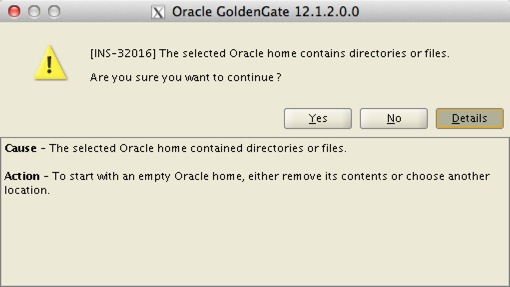
4. Click “yes” on this prompt. I think I know what I am doing!
5. Review changes and click “Install”.

6. Progress is good! If you are prompted whether the directory is not empty, simply select “yes” and proceed.

7. Awesome!

Upgrade
Upgrade
8. Review the installation, and validate the binaries startup successfully.
[oracle@blue]$ pwd
/u01/app/ggate
[oracle@blue ggate]$ ./ggsci

Oracle GoldenGate Command Interpreter for Oracle
Version 12.1.2.0.0 17185003 OGGCORE_12.1.2.0.0_PLATFORMS_130924.1316_FBO
Linux, x64, 64bit (optimized), Oracle 11g on Sep 25 2013 00:31:13
Operating system character set identified as UTF-8.

Copyright (C) 1995, 2013, Oracle and/or its affiliates. All rights reserved.

GGSCI (blue.color) 1> info all

Program     Status      Group       Lag at Chkpt  Time Since Chkpt

MANAGER     RUNNING
EXTRACT     STOPPED     E_GG        00:00:00      00:37:10
REPLICAT    STOPPED     R_GG        00:00:00      00:37:10
9. Upgrade the Checkpointtable. This needs to be done on both source and target databases!
GGSCI (blue.color) 2> dblogin userid ggate, password ggate
Successfully logged into database.

GGSCI (blue.color) 5> upgrade checkpointtable

No checkpoint table specified. Using GLOBALS specification (ggate.checkpoint)...

Successfully upgraded checkpoint table ggate.checkpoint.
10. Start the Extract
GGSCI (blue.color) 2> start e_gg

Sending START request to MANAGER ...
EXTRACT E_GG starting

GGSCI (blue.color) 3> info all

Program     Status      Group       Lag at Chkpt  Time Since Chkpt

MANAGER     RUNNING
EXTRACT     ABENDED     E_GG        00:00:00      00:38:40
REPLICAT    STOPPED     R_GG        00:00:00      00:38:40
2013-12-05 21:40:13 ERROR OGG-01416 File ./dirdat/lt000005, with format RELEASE 11.2, does not match current format specification of RELEASE 12.1. Modify the parameter file to specify format RELEASE 11.2 or issue ETROLLOVER prior to restart.
12. Ok, my mistake :)
Modify the parameter file to specify format RELEASE 11.2 or issue ETROLLOVER prior to restart.
12.1. Option #1: Let’s make the correct parameter change and try again. Add the following to the EXTTRAIL ./dirdat/lt in the extracts parameter file.
Modify the parameter file to specify format RELEASE 11.2 or issue ETROLLOVER prior to restart.
12.1. Option #1: Let’s make the correct parameter change and try again. Add the following to the EXTTRAIL ./dirdat/lt in the extracts parameter file.
EXTTRAIL ./dirdat/lt, FORMAT RELEASE 11.2
12.2. Option #2: Start a new trail sequence by issuing a roll-over command.
GGSCI> alter extract e_gg etrollover12.2.1. Starting it again!
GGSCI (blue.color) 6> start e_gg

Sending START request to MANAGER ...
EXTRACT E_GG starting

GGSCI (blue.color) 7> info all

Program     Status      Group       Lag at Chkpt  Time Since Chkpt

MANAGER     RUNNING
EXTRACT     RUNNING     E_GG        00:00:00      00:00:04
REPLICAT    STOPPED     R_GG        00:00:00      00:54:46
12.3. Great, now we can make the same change to the replicat’s parameter file and start it.
GGSCI (blue.color) 13> start r_gg

Sending START request to MANAGER ...
REPLICAT R_GG starting

GGSCI (blue.color) 14> info all

Program     Status      Group       Lag at Chkpt  Time Since Chkpt

MANAGER     RUNNING
EXTRACT     RUNNING     E_GG        00:00:00      00:00:04
REPLICAT    RUNNING     R_GG        00:00:00      00:00:01
13. Excellent!! Now we are done with the installation of 12c and upgrade of 11g to 12c!
Hopefully this has been educational for you. I hope to dive further into some of the new features in 12c.
Cheers!
Cheers!
Sunday, July 21, 2013
Oracle Enterprise Manager 12c: Unable to Login using SYSMAN after unsuccessful Upgrade
After an incomplete attempt to upgrade OEM 12.1.0.2.0 to
12.1.0.3.0, a few days later I received a call from my client that the sysman
password is not working. Interesting.
We validated the sysman account from the database and it was
correct. The issue was on the WebLogic layer.
So, what changed? According to the customer, their Systems
Administrators applied OS Security Patches during the weekend.
Other than that, the one apparent thing you need to do as
part of the pre-upgrade steps is to copy the emkey to the repository. Did I
remove it?
D:\>D:\oracle\app\product\12.1.0\middleware1\oms\bin\emctl
status emkey
Oracle Enterprise Manager Cloud Control 12c
Release 2
Copyright (c) 1996, 2012 Oracle Corporation. All rights reserved.
Enter Enterprise Manager Root (SYSMAN) Password :
The EMKey
is configured properly, but is not secure. Secure the EMKey by running
"emctl config emkey -remove_from_repos".
|
Apparently not :)
D:\>emctl config emkey -remove_from_repos
Oracle Enterprise Manager Cloud Control 12c
Release 2
Copyright (c) 1996, 2012 Oracle Corporation. All rights reserved.
Enter Enterprise Manager Root (SYSMAN) Password :
The EMKey has been removed from the Management
Repository.
|
So, I removed it.
D:\>D:\oracle\app\product\12.1.0\middleware1\oms\bin\emctl
status emkey
Oracle Enterprise Manager Cloud Control 12c
Release 2
Copyright (c) 1996, 2012 Oracle Corporation. All rights reserved.
Enter Enterprise Manager Root (SYSMAN) Password :
The EMKey is configured properly.
D:\>D:\oracle\app\product\12.1.0\middleware1\oms\bin\emctl
stop oms
Oracle Enterprise Manager Cloud Control 12c
Release 2
Copyright (c) 1996, 2012 Oracle Corporation. All rights reserved.
Stopping WebTier...
WebTier Successfully Stopped
Stopping Oracle Management Server...
Oracle Management Server Successfully Stopped
Oracle Management Server is Down
|
Hmm, no luck. OEM is refusing to let me login as SYSMAN via
the console.
D:\>D:\oracle\app\product\12.1.0\middleware1\oms\bin\emctl
config oms -change_repos_pwd -use_sys_pwd -sys_pwd mycurrentsecret -new_pwd
mynewsecret
Oracle Enterprise Manager Cloud Control 12c
Release 2
Copyright (c) 1996, 2012 Oracle Corporation. All rights reserved.
Changing passwords in backend ...
Passwords changed in backend successfully.
Updating repository password in Credential
Store...
Successfully updated Repository password in
Credential Store.
Restart all the OMSs using 'emctl stop oms -all'
and 'emctl start oms'.
Successfully changed repository password.
|
Restart.
D:\>D:\oracle\app\product\12.1.0\middleware1\oms\bin\emctl
stop oms -all
Oracle Enterprise Manager Cloud Control 12c
Release 2
Copyright (c) 1996, 2012 Oracle Corporation. All rights reserved.
Stopping WebTier...
WebTier Successfully Stopped
Stopping Oracle Management Server...
Oracle Management Server Already Stopped
AdminServer Successfully Stopped
Oracle Management Server is Down
D:\>D:\oracle\app\product\12.1.0\middleware1\oms\bin\emctl
start oms
Oracle Enterprise Manager Cloud Control 12c
Release 2
Copyright (c) 1996, 2012 Oracle Corporation. All rights reserved.
Windows service OracleManagementServer_EMGC_OMS1_1
successfully started
Oracle Management Server is Up
D:\>D:\oracle\app\product\12.1.0\middleware1\oms\bin\emctl
status oms -details
Oracle Enterprise Manager Cloud Control 12c
Release 2
Copyright (c) 1996, 2012 Oracle Corporation. All rights reserved.
Enter Enterprise Manager Root (SYSMAN) Password :
Console Server Host : oem.server.mine
HTTP Console Port : 7789
HTTPS Console Port : 7800
HTTP Upload Port : 4890
HTTPS Upload Port : 4899
EM Instance Home :
D:\oracle\app\product\12.1.0\middleware1\gc_inst\em\EMGC_OMS1
OMS Log Directory Location :
D:\oracle\app\product\12.1.0\middleware1\gc_inst\em\EMGC_OMS1/sysman/log
OMS is not configured with SLB or virtual hostname
Agent Upload is locked.
OMS Console is locked.
Active CA ID: 1
Console URL: https:// oem.server.mine:7800/em
Upload URL: https:// oem.server.mine:4899/empbs/upload
WLS Domain Information
Domain Name
: GCDomain
Admin Server Host: oem.server.mine
Managed Server Information
Managed Server Instance Name: EMGC_OMS1
Managed Server Instance Host: oem.server.mine
WebTier is Up
Oracle Management Server is Up
|
And yet, I still couldn't successfully log into OEM. Think
man, think: What else did you change??
Then I remembered this screen pop during the upgrade.

Okay, let’s check the repository.
D:\>%ORACLE_HOME%\bin\sqlplus / as sysdba
SQL*Plus: Release 11.2.0.1.0 Production on Sun Jul
21 15:26:30 2013
Copyright (c) 1982, 2010, Oracle. All rights reserved.
Connected to:
Oracle Database 11g Enterprise Edition Release
11.2.0.1.0 - 64bit Production
With the Partitioning, OLAP, Data Mining and Real
Application Testing options
SQL> show parameter job
NAME TYPE VALUE
------------------------------------ -----------
------------------------------
job_queue_processes integer 0
|
Idiot! Go and change it back to its original value!
SQL> alter system set job_queue_processes=1000;
System altered.
SQL> show parameter job
NAME TYPE VALUE
------------------------------------ -----------
------------------------------
job_queue_processes integer 1000
|
Restart OMS.
And magically, I’m now able to log into OEM using the SYSMAN
password.
Monday, July 8, 2013
Oracle Enterprise Manager 12.1.0.2.0 to 12.1.0.3.0 Upgrade with 12.1.0.1.0 Database
As promised, the upgrade steps for a single instance OMS are
detailed below. My pre-upgrade environment:
Host: OEM 6.3 64bit
OMS: 12.1.0.2.0
Repository: 12.1.0.1.0

How pretentious. Of course I know what I’m doing!!


[oracle@spoon config]$ emctl config emkey
-copy_to_repos_from_file -repos_host spoon.song -repos_port 1521 -repos_sid
monster -repos_user sysman -emkey_file
/u01/app/oracle/middelware/oms/sysman/config/emkey.ora
Oracle Enterprise Manager Cloud Control 12c Release 2
Copyright (c) 1996, 2012 Oracle Corporation. All rights reserved.
Enter Admin User's Password :
Enter Enterprise Manager Root (SYSMAN) Password :
The EMKey has been copied to the Management Repository. This
operation will cause the EMKey to become unsecure.
After the required operation has been completed, secure the EMKey
by running "emctl config emkey -remove_from_repos".
|


[oracle@spoon config]$ . oraenv
ORACLE_SID = [OEM] ? monster
The Oracle base for
ORACLE_HOME=/u01/app/oracle/product/11.2.0/dbhome_1 is /u01/app/oracle
[oracle@spoon config]$ sqlplus / as sysdba
SQL*Plus: Release 11.2.0.1.0 Production on Mon Jul
1 12:40:51 2013
Copyright (c) 1982, 2009, Oracle. All rights reserved.
Connected to:
Oracle Database 11g Enterprise Edition Release
11.2.0.1.0 - 64bit Production
With the Partitioning, OLAP, Data Mining and Real
Application Testing options
SQL> grant execute on dbms_random to dbsnmp;
Grant succeeded.
SQL> ALTER DATABASE ADD LOGFILE SIZE 300M;
SQL> ALTER DATABASE ADD LOGFILE SIZE 300M;
SQL> ALTER DATABASE ADD LOGFILE SIZE 300M;
|


ORACLE_SID = [monster] ? OEM
The Oracle base for
ORACLE_HOME=/u01/app/oracle/middelware/oms is /u01/app/oracle
[oracle@spoon config]$ emctl stop oms
Oracle Enterprise Manager Cloud Control 12c
Release 2
Copyright (c) 1996, 2012 Oracle Corporation. All rights reserved.
Stopping WebTier...
WebTier Successfully Stopped
Stopping Oracle Management Server...
Oracle Management Server Successfully Stopped
Oracle Management Server is Down
|


A Cup of Tea

And Tomb Raider 2013 later


[root@spoon ~]#
/u01/app/oracle/12.1.0.3/middleware/oms/allroot.sh
Starting to execute allroot.sh .........
Starting to execute
/u01/app/oracle/12.1.0.3/middleware/oms/root.sh ......
Running Oracle 11g root.sh script...
The following environment variables are set as:
ORACLE_OWNER= oracle
ORACLE_HOME=
/u01/app/oracle/12.1.0.3/middleware/oms
Enter the full pathname of the local bin
directory: [/usr/local/bin]:
The file "dbhome" already exists in
/usr/local/bin. Overwrite it? (y/n)
[n]:
The file "oraenv" already exists in
/usr/local/bin. Overwrite it? (y/n)
[n]:
The file "coraenv" already exists in
/usr/local/bin. Overwrite it? (y/n)
[n]:
Entries will be added to the /etc/oratab file as
needed by
Database Configuration Assistant when a database
is created
Finished running generic part of root.sh script.
Now product-specific root actions will be
performed.
/etc exist
/u01/app/oracle/12.1.0.3/middleware/oms
Finished execution of
/u01/app/oracle/12.1.0.3/middleware/oms/root.sh ......
|

After logging into OMS, I can see there are targets in
“Unknown” status.

It seems the agent did not start correctly. That is excepted
because, according to the documentation
“Management Agents, including the central agent installed on
the Oracle Management Service (OMS) host, are not upgraded automatically while
upgrading to Enterprise Manager Cloud Control 12c Release 3
(12.1.0.3). Ensure that you upgrade the central agent installed on the OMS host
immediately after upgrading the old OMS to 12.1.0.3.”
Let’s proceed with the upgrade.
First, ensure that you have the latest Agent Software
available.


Submit it!
Presumably because the “oracle” user doesn’t have sudo
access.


Progress!


I made sure the agent has the latest Oracle Database
(12.1.0.4.0) plugin.
[oracle@spoon bin]$ ./emctl listplugins agent
Oracle Enterprise Manager Cloud Control 12c
Release 3
Copyright (c) 1996, 2013 Oracle Corporation. All rights reserved.
---------------------------------------------------------------
oracle.fmw.gg
12.1.0.1.0
/u01/app/oracle/agent/plugins/oracle.fmw.gg.agent.plugin_12.1.0.1.0
oracle.sysman.beacon 12.1.0.3.0 /u01/app/oracle/agent/plugins/oracle.sysman.beacon.agent.plugin_12.1.0.3.0
oracle.sysman.emas
12.1.0.4.0
/u01/app/oracle/agent/plugins/oracle.sysman.emas.agent.plugin_12.1.0.4.0
oracle.sysman.emrep 12.1.0.3.0
/u01/app/oracle/agent/plugins/oracle.sysman.emrep.agent.plugin_12.1.0.3.0
oracle.sysman.db
12.1.0.4.0
/u01/app/oracle/agent/plugins/oracle.sysman.db.agent.plugin_12.1.0.4.0
oracle.sysman.oh
12.1.0.3.0
/u01/app/oracle/agent/plugins/oracle.sysman.oh.agent.plugin_12.1.0.3.0
oracle.sysman.csa
12.1.0.3.0
/u01/app/oracle/agent/plugins/oracle.sysman.csa.agent.plugin_12.1.0.3.0
|
Before we starting having fun, we need to do house cleaning.


Nice!

Subscribe to:
Posts
(
Atom
)