Tuesday, September 3, 2013
A Not So Straightforward Approach to Manual Database (CDB and PDB) Creation Via SQL*Plus
While beginning my tinkering with Database 12c, I was curious to create the container database via SQL*Plus. Below are the steps I followed.
Set your environment variable for ORACLE_SID. It’s a given that you need ORACLE_HOME set J
[oracle@collabn1 dbs]$ ORACLE_SID=beans
[oracle@collabn1 dbs]$ export ORACLE_SID
Edit your initialization parameter file. It is important to note, for the CREATE DATABASE script to create the SEED database, the ENABLE_PLUGGABLE_DATABASE parameter must be set to TRUE. To simplify my creation, I enabled Oracle Managed Filsystem (OMF) by setting db_create_file_dest.
[oracle@collabn1 dbs]$ ls -lhtr
total 16K
-rw-r--r-- 1 oracle oinstall 3.0K Feb  3  2012 init.ora
-rw-r----- 1 oracle oinstall   33 Sep  1 16:15 initrac1.ora
-rw-r----- 1 oracle oinstall    0 Sep  2 14:05 lkinstslob
-rw-rw---- 1 oracle oinstall 1.6K Sep  2 14:05 hc_slob.dat
-rw-rw---- 1 oracle oinstall 1.6K Sep  2 15:00 hc_rac1.dat
[oracle@collabn1 dbs]$ vi initbeans.ora
db_name='beans'
memory_target=1G
processes=150
db_block_size=8192
db_domain=''
db_create_file_dest='+DATA'
db_recovery_file_dest='+FRA'
db_recovery_file_dest_size=2G
diagnostic_dest='/u01/app/oracle'
dispatchers='(PROTOCOL=TCP) (SERVICE=BEANSXDB)'
open_cursors=300
remote_login_passwordfile='EXCLUSIVE'
undo_tablespace='UNDOTBS1'
control_files=('+DATA', '+FRA')
compatible='12.0.0'
enable_pluggable_database=true
Create the server parameter file from the above parameter file.
[oracle@collabn1 dbs]$ sqlplus / as sysdba

SQL*Plus: Release 12.1.0.1.0 Production on Mon Sep 2 15:08:46 2013

Copyright (c) 1982, 2013, Oracle.  All rights reserved.

Connected to an idle instance.

SQL> create spfile from pfile;

File created.
Start the instance in nomount state.
SQL> startup nomount;
ORACLE instance started.

Total System Global Area 1068937216 bytes
Fixed Size                  2296576 bytes
Variable Size             671089920 bytes
Database Buffers          390070272 bytes
Redo Buffers                5480448 bytes
Create the Container Database. I’ll create a pluggable one later in the article.
SQL> CREATE DATABASE beans
USER SYS IDENTIFIED BY "oracle"
USER SYSTEM IDENTIFIED BY "oracle"
EXTENT MANAGEMENT LOCAL
DEFAULT TABLESPACE users
DEFAULT TEMPORARY TABLESPACE temp
UNDO TABLESPACE undotbs1
ENABLE PLUGGABLE DATABASE
      SEED
            SYSTEM DATAFILES SIZE 125M AUTOEXTEND ON NEXT 10M MAXSIZE UNLIMITED
            SYSAUX DATAFILES SIZE 100M;

Database created.
Let’s add a couple of tablespaces.
SQL> CREATE TABLESPACE apps_tbs LOGGING
     DATAFILE '+DATA'
     SIZE 500M REUSE AUTOEXTEND ON NEXT 1280K MAXSIZE UNLIMITED
     EXTENT MANAGEMENT LOCAL;

Tablespace created.

SQL> CREATE TABLESPACE indx_tbs LOGGING
     DATAFILE '+DATA'
     SIZE 100M REUSE AUTOEXTEND ON NEXT 1280K MAXSIZE UNLIMITED
     EXTENT MANAGEMENT LOCAL;

Tablespace created.
Build dictionary views
SQL> @?/rdbms/admin/catalog.sql
SQL> @?/rdbms/admin/catproc.sql
As the system user, run the following script.
SQL> @?/sqlplus/admin/pupbld.sql
So far, the creation steps have been similar to previous versions. Of course, the last few scripts create objects specific to the new Pluggable Database architecture.
Courtesy of Wissem’s article, I found I was missing a few extra scripts.
SQL> @?/rdbms/admin/catblock.sql
SQL> @?/rdbms/admin/catoctk.sql
SQL> @?/rdbms/admin/owminst.plb
The last script (mentioned in Oracle Documentation) doesn’t exist!
Apparently it’s a bug which will be fixed in a future release. Bug 17033183 - $OH/rdbms/admin/catcdb.sql is missing from 12c release (Doc ID 17033183.8)
SQL> @?/rdbms/admin/catcdb.sql
SP2-0310: unable to open file "/u01/app/oracle/product/12.1.0.1/dbhome_1/rdbms/admin/catcdb.sql"
SQL> select open_mode from v$database;

OPEN_MODE
--------------------
READ WRITE

1 row selected.

SQL> select con_id,dbid,NAME,OPEN_MODE from v$pdbs;

    CON_ID       DBID NAME                           OPEN_MODE
---------- ---------- ------------------------------ ----------
         2 4067699455 PDB$SEED                       READ ONLY

1 row selected.

SQL> SELECT NAME from  v$database;

NAME
---------
BEANS

1 row selected.
Configure Enterprise Manager Express
SQL> exec DBMS_XDB_CONFIG.SETHTTPSPORT(5501);

PL/SQL procedure successfully completed.
At this point, our database looks like this:

Create a Pluggable Database from the Seed Database
Next, we start with creating a Pluggable Database from the Seed (PDB$SEED).
The script below created a pluggable database from PDB$SEED, with an administrator called heinzadmin, storage limit of 2G and maximum shared temporary tablespace size to 100M and, a default tablespace called heinz_data.
SQL> CREATE PLUGGABLE DATABASE heinz_pdb ADMIN USER heinz_admin IDENTIFIED BY beans
  STORAGE (MAXSIZE 2G MAX_SHARED_TEMP_SIZE 100M)
  DEFAULT TABLESPACE heinz_data
    DATAFILE '+DATA' SIZE 250M AUTOEXTEND ON;
CREATE PLUGGABLE DATABASE heinz_pdb ADMIN USER heinz_admin IDENTIFIED BY beans
*
ERROR at line 1:
ORA-00604: error occurred at recursive SQL level 1
ORA-00942: table or view does not exist
Interesting, nothing in the alert.log that’s of use either.
[oracle@collabn1 trace]$ tail -f alert_beans.log
…
Mon Sep 02 23:35:18 2013
CREATE PLUGGABLE DATABASE heinz_pdb ADMIN USER heinz_admin IDENTIFIED BY *  STORAGE (MAXSIZE 2G MAX_SHARED_TEMP_SIZE 100M)
  DEFAULT TABLESPACE heinz_data
    DATAFILE '+DATA' SIZE 250M AUTOEXTEND ON
ORA-604 signalled during: CREATE PLUGGABLE DATABASE heinz_pdb ADMIN USER heinz_admin IDENTIFIED BY *  STORAGE (MAXSIZE 2G MAX_SHARED_TEMP_SIZE 100M)
  DEFAULT TABLESPACE heinz_data
    DATAFILE '+DATA' SIZE 250M AUTOEXTEND ON...
I can, however, successfully create the pluggable database on a CDB created using DBCA. I assume I am missing a component but, I can’t find anything in MOS of use. It would be too easy to say that it’s a bug but, I will log a ticket with MOS at some point this week.
For the sake of continuing my investigation, I will use the new RAC database. This was configured as a Real Application Cluster database – I know, the name isn’t exactly original J
SQL> select name, open_mode from v$database;

NAME    OPEN_MODE
--------- --------------------
RAC     READ WRITE

SQL> CREATE PLUGGABLE DATABASE heinz_pdb ADMIN USER heinz_admin IDENTIFIED BY beans
  STORAGE (MAXSIZE 2G MAX_SHARED_TEMP_SIZE 100M)
  DEFAULT TABLESPACE heinz_data
    DATAFILE '+DATA' SIZE 250M AUTOEXTEND ON;

Pluggable database created.
SQL> select con_id, name, open_mode from v$pdbs;

    CON_ID NAME                 OPEN_MODE
---------- ------------------------------ ----------
       2 PDB$SEED               READ ONLY
       3 PDB                   MOUNTED
       4 HEINZ_PDB              MOUNTED

SQL> alter pluggable database Heinz_pdb open;

Pluggable database altered.

SQL> select con_id, name, open_mode from v$pdbs;

    CON_ID NAME                 OPEN_MODE
---------- ------------------------------ ----------
       2 PDB$SEED               READ ONLY
       3 PDB                    MOUNTED
       4 HEINZ_PDB              READ WRITE
Create a Pluggable Database from Clone

According to documentation, it’s pretty easy!
SQL> create pluggable database bushbrothers_pdb from heinz_pdb;
create pluggable database bushbrothers_pdb from heinz_pdb
*
ERROR at line 1:
ORA-65081: database or pluggable database is not open in read only mode
Oops. Which mode is it in now?
SQL> select con_id, name, open_mode from v$pdbs;

    CON_ID NAME                 OPEN_MODE
---------- ------------------------------ ----------
       2 PDB$SEED               READ ONLY
       3 PDB                    MOUNTED
       4 HEINZ_PDB              MOUNTED
Okay, I see my mistake. It needs to be in READ ONLY mode.
SQL> alter pluggable database heinz_pdb open read only;
alter pluggable database heinz_pdb open read only
*
ERROR at line 1:
ORA-65085: cannot open pluggable database in read only mode
I wasn’t sure why this one gave me an error. I worked around it by switching my session, opening it for read write, shutdown and then started with read only option.
SQL> alter session set container=heinz_pdb;

Session altered.

SQL> alter database open read only;
alter database open read only
*
ERROR at line 1:
ORA-65085: cannot open pluggable database in read only mode

SQL> alter database open;

Database altered.

SQL> select con_id, name, open_mode from v$pdbs;

    CON_ID NAME                 OPEN_MODE
---------- ------------------------------ ----------
       4 HEINZ_PDB                    READ WRITE

SQL> shutdown immediate
Pluggable Database closed.

SQL> select con_id, name, open_mode from v$pdbs;

    CON_ID NAME                 OPEN_MODE
---------- ------------------------------ ----------
       4 HEINZ_PDB                    MOUNTED

SQL> alter database open read only;

Database altered.

SQL> select con_id, name, open_mode from v$pdbs;

    CON_ID NAME                 OPEN_MODE
---------- ------------------------------ ----------
       4 HEINZ_PDB                    READ ONLY
Okay, now I’m all set to try the clone again.
SQL> create pluggable database bushbrothers_pdb from heinz_pdb;
create pluggable database bushbrothers_pdb from heinz_pdb
*
ERROR at line 1:
ORA-00604: error occurred at recursive SQL level
ORA-19504: failed to create file "+DATA"
Hmm. Interesting. What say you oh alert.log?
Tue Sep 03 00:01:57 2013
create pluggable database bushbrothers_pdb from heinz_pdb
ORA-604 signalled during: create pluggable database bushbrothers_pdb from heinz_pdb...
Nothing useful! I believe the issue lies in using OMF (regardless of the fact that I’m using ASM). For the time being, I will revert to a single instance database that’s not running on ASM to continue with my investigation. Don’t worry; I will revisit this at a later date. At a later date only because it is 12:30 AM here and I have to be at work in the morning J
Starting over!
Create a Pluggable Database from Clone
Let’s find out what's in this new database.
SQL> select name, open_mode from v$database;

NAME    OPEN_MODE
--------- --------------------
SESAMEST  READ WRITE

SQL> select con_id,dbid,NAME,OPEN_MODE from v$pdbs;

    CON_ID  DBID NAME                   OPEN_MODE
---------- ---------- ------------------------------ ----------
       2 4061728508 PDB$SEED                   READ ONLY
       3 2760837952 GROVER                     MOUNTED
Datafile locations.
SQL> select file_name from dba_data_Files;

FILE_NAME
--------------------------------------------------------------------------------
/home/oracle/oradata/SESAMESTREET/datafile/o1_mf_system_8wpfkdq9_.dbf
/home/oracle/oradata/SESAMESTREET/datafile/o1_mf_sysaux_8wpfhcmz_.dbf
/home/oracle/oradata/SESAMESTREET/datafile/o1_mf_undotbs1_8wpfmh17_.dbf
/home/oracle/oradata/SESAMESTREET/datafile/o1_mf_users_8wpfmfwc_.dbf
Issue the create statement again.
SQL> select con_id,dbid,NAME,OPEN_MODE from v$pdbs;

    CON_ID  DBID NAME                   OPEN_MODE
---------- ---------- ------------------------------ ----------
       2 4061728508 PDB$SEED                   READ ONLY
       3 2760837952 GROVER                     READ ONLY

SQL> alter pluggable database grover open read only;

Pluggable database altered.

SQL> create pluggable database oscar from grover;

Pluggable database created.

SQL> select con_id,dbid,NAME,OPEN_MODE from v$pdbs;

    CON_ID  DBID NAME                   OPEN_MODE
---------- ---------- ------------------------------ ----------
       2 4061728508 PDB$SEED                   READ ONLY
       3 2760837952 GROVER                     READ ONLY
       4 1749240269 OSCAR                      MOUNTED

SQL> alter pluggable database oscar open;

Pluggable database altered.

SQL> select con_id,dbid,NAME,OPEN_MODE from v$pdbs;

    CON_ID  DBID NAME                   OPEN_MODE
---------- ---------- ------------------------------ ----------
       2 4061728508 PDB$SEED                   READ ONLY
       3 2760837952 GROVER                     READ ONLY
       4 1749240269 OSCAR                      READ WRITE
Bingo! That worked!
SQL> alter session set container=oscar;

Session altered.

SQL> select username from dba_users;

USERNAME
--------------------------------------------------------------------------------
SYS
SYSTEM
OLAPSYS
SI_INFORMTN_SCHEMA
PDBADMIN
DVSYS
AUDSYS
GSMUSER
ORDPLUGINS
SPATIAL_WFS_ADMIN_USR
SPATIAL_CSW_ADMIN_USR

USERNAME
--------------------------------------------------------------------------------
XDB
HR
APEX_PUBLIC_USER
GROVER_FAN_1 # User from the Grover Pluggable Database
OE
SYSDG
DIP
OUTLN
SH
ANONYMOUS
CTXSYS

USERNAME
--------------------------------------------------------------------------------
ORDDATA
IX
SYSBACKUP
MDDATA
GSMCATUSER
GSMADMIN_INTERNAL
PM
BI
LBACSYS
SYSKM
XS$NULL

USERNAME
--------------------------------------------------------------------------------
OJVMSYS
APPQOSSYS
ORACLE_OCM
APEX_040200
WMSYS
SCOTT
DBSNMP
ORDSYS
MDSYS
DVF
FLOWS_FILES

44 rows selected.
Just to make sure, lets check the location of the data files.
SQL> set lines 1000
SQL> select file_name from dba_data_files;

FILE_NAME
----------------------------------------------------------------
/home/oracle/oradata/SESAMESTREET/E5744BAEDB960B47E0430100007F20BF/datafile/o1_mf_example_92bt5px5_.dbf
/home/oracle/oradata/SESAMESTREET/E5744BAEDB960B47E0430100007F20BF/datafile/o1_mf_users_92bt5ot7_.dbf
/home/oracle/oradata/SESAMESTREET/E5744BAEDB960B47E0430100007F20BF/datafile/o1_mf_sysaux_92bt4g44_.dbf
/home/oracle/oradata/SESAMESTREET/E5744BAEDB960B47E0430100007F20BF/datafile/o1_mf_system_92bt4g2p_.dbf
Interestingly enough, the GUID is used as the unique identifier of the folders within DB_CREATE_FILE_DEST.
SQL> select con_id, con_uid, guid, name from v$pdbs;

    CON_ID    CON_UID GUID                       NAME
---------- ---------- -------------------------------- ------------------------------
       4 1749240269 E5744BAEDB960B47E0430100007F20BF OSCAR
Conclusion
As big a fan as I am of the command line interface, there seem to be a few issues with the create statements. I plan to revisit these steps at a later date. For now, I did create an SR with Oracle support regarding the creation of a Pluggable Database from a Container Database created via SQL*Plus.
If you have any questions or comments, please feel free to share!
Cheers.
Links:
Saturday, August 31, 2013
Adventures in Hadoop: #1 The First Step is the Most Important
I consider myself a tenaciously curious person. In the spirit of "discovery" I've embarked on learning Hadoop and, subsequently the various bits and pieces that are associated with it. Since I am now "into" blogging, it occurred to me that there might be others like myself who are keen on learning about Hadoop. Below is a listed of useful blogs I visited in my quest of knowledge.
This picture (from my daughters room) aptly represents me vs BIG DATA :)

Note: This blog is a Work In-Progress (WIP). Please revisit it frequently for updated content :)
Hadoop
Without a doubt a useful technology when applied to the correct use-case. I think it all boils down to "What is your question?". But, before I got too philosophical, the more relevant question was "How does it work?". I stumbled on to Michael Noll's tutorial on configuring a Single Node Cluster. He did an amazing job creating step by step documentation on the setup. It was easy enough to configure it and test with the Gutenberg examples
Don't forget to check out the Web Interface for the NameNode, JobTracker and, TaskTracker.

Pig
At this point, I was thinking "Great, I have a Hadoop install but, how do I easily get it to do my work?". I mean, I can program in Java but I'm no Ace! Enter, Pig Latin.
Once again, I found an excellent article by Wayne Adams which outlined how to leverage Pig to "ask" the question. He used the data dumps available for New Issues Pool Statistics to illustrate how Pig Latin is utilized on Hadoop.

Hive
Again, as I mentioned above, I'm from a DBA background so queries are familiar to me. Hive is a great add-on to Hadoop which allows for a SQL interface approach to NoSQL. I'm thinking External Tables in Oracle when I created the tables from Ben Hidalgo's example.

Conclusion
I tend to drift towards over-simplification at times, and since I come from a DBA background with development roots, I like to use the "You get what you ask" analogy when dealing with an instance. For example, if you ask for a lot of data, well, you're going to get it and - unless you're on something like an Exadata machine - it might take a while. You know, as a stupid question and you'll get a stupid answer type of deal. The point of my rant is, from what I surmise, Hadoop (NoSQL) has its place for certain use-cases and the "right" solution depends on the "right" question.
I'm planning to rebuild this environment because its been a couple of weeks since I last tinkered with it. I aim to provide more details on this blog for each step. I've started working with R and how - at the very least I - can use it for my every day work.
Next in Series: #2 Starting from Scratch
Next in Series: #2 Starting from Scratch
Other Useful Links
Thursday, August 15, 2013
A Moment of Honesty - So refreshing
I was chatting with one of our interns this morning about an customers issue. The topic was something to do with removing a target from OEM using EMCLI and, as usual, I wanted it to be a good learning experience for the intern. Though, at one point after the issue was resolved, the intern was compelled to say this to me:
Cheers!
INTERN> a moment of honesty and do not take this the wrong way at all. you're a scary teacher but your method makes you a very good one lol
INTERN> one of the best i have ever had
INTERN> i only mean scary in the sense that you ask us a lot of questions to pull out answers and not knowing the answer can be unsettling in my mind despite me still learning hahaI couldn't help but chuckle and laugh at this - the intern is a good kid and quite good at picking up whatever I throw at him - and, I guess I tend to expect much. I suppose both of us learned something today: I, told the intern that I will try not to be as scary in the future and the intern, that I am not as scary as I seem to be :)
Cheers!
Wednesday, August 7, 2013
Oracle Enterprise Manager 12c Windows Agent Deployments Made Easy
As of late, I've had to do a few Windows OS Agent Deployments. As we all know, if you want to auto deploy to a Windows OS, you need to have CygWin installed (on each target host) first.
The alternative, via Silent Install, is illustrated by my good friend Bobby Curtis here. However, for large scale quicker deployments, I came up with an a solution which worked quite well.
Assuming you have already download the agent binaries from the OMS server, copy them to a centralized location accessible to all target hosts. In my case, I used \\slave\software\oracle\oem\12.1.0.3.0\agent
The important thing here is the content of the agent.rsp file. Mine looks like this. I did not keep the ORACLE_HOSTNAME parameter within the response file (agent.rsp)
The alternative, via Silent Install, is illustrated by my good friend Bobby Curtis here. However, for large scale quicker deployments, I came up with an a solution which worked quite well.
Assuming you have already download the agent binaries from the OMS server, copy them to a centralized location accessible to all target hosts. In my case, I used \\slave\software\oracle\oem\12.1.0.3.0\agent
The important thing here is the content of the agent.rsp file. Mine looks like this. I did not keep the ORACLE_HOSTNAME parameter within the response file (agent.rsp)
####################################################################
## copyright (c) 1999, 2012 Oracle. All rights reserved. ##
## ##
## Specify values for the variables listed below to customize ##
## your installation. ##
## ##
## Each variable is associated with a comment. The comment ##
## identifies the variable type. ##
## ##
## Please specify the values in the following format: ##
## ##
## Type Example ##
## String "Sample Value" ##
## Boolean True or False ##
## Number 1000 ##
## StringList {"String value 1","String Value 2"} ##
## ##
## The values that are given as  need to be ##
## specified for a silent installation to be successful. ##
## ##
## ##
## This response file is generated by Oracle Software ##
## Packager. ##
###################################################################

RESPONSEFILE_VERSION=2.2.1.0.0

#-------------------------------------------------------------------------------
#OMS_HOST: OMS host info required to connect to OMS
#EM_UPLOAD_PORT: OMS port info required to connect to OMS
#AGENT_REGISTRATION_PASSWORD: Agent Registration Password needed to
# establish a secure connection to the OMS.
#AGENT_INSTANCE_HOME: Agent instance home is the location of agent state directory.
#AGENT_PORT: Agent port on which the agent process should be started.
#b_startAgent: Agent will not be started after configuration if the value specified is false.
#ORACLE_HOSTNAME: Fully qualified domain name of host where is the agent is deployed.
#s_agentHomeName:Customized Oracle home name for the agent home. Example: s_agentHomeName="agent12gR1"
#-------------------------------------------------------------------------------
OMS_HOST=cruiser.missile.com
EM_UPLOAD_PORT=4899
AGENT_REGISTRATION_PASSWORD=you_havent_changed_the_sysman_password
AGENT_INSTANCE_HOME=D:\oracle\app\product\12.1\agent
AGENT_PORT=3875
b_startAgent=true
s_agentHomeName=agent12c_home1
#-------------------------------------------------------------------------------
#s_agentServiceName: Sets the agent Service Name and this variable can be
# used to overrite the agent service name calculated by the install. This is
# required for only Windows.
# Example:
# s_agentServiceName = "Oracleagent12gAgent" ; default value
# s_agentServiceName = "GridAgent" ; User specified value
#-------------------------------------------------------------------------------
s_agentServiceName="Oracleagent12cAgent"

####################################################################################
#Please Don't change the values of these variables
####################################################################################
#-------------------------------------------------------------------------------
#EM_INSTALL_TYPE: install type
#-------------------------------------------------------------------------------
EM_INSTALL_TYPE="AGENT"
I then created a wrapper install script. Since I was deploying on windows, the script looked like
c:\> view DeployTheAgent.bat
\\slave\software\oracle\oem\12.1.0.3.0\agent\agentDeploy.bat AGENT_BASE_DIR=D:\Oracle\app\product\12.1 RESPONSE_FILE=\\slave\software\oracle\oem\12.1.0.3.0\agent\agent.rsp ORACLE_HOSTNAME=%COMPUTERNAME%.%USERDNSDOMAIN%
The linux version of this might look something like
$ cat
DeployTheAgent.sh
\\slave\software\oracle\oem\12.1.0.3.0\agent\agentDeploy.sh AGENT_BASE_DIR=/u01/app/oracle/product/12.1 RESPONSE_FILE=<path to mounted drive>\<agent software directory>\agent.rsp ORACLE_HOSTNAME=hostname.domainname
From here, its a simple as invoking the script from the target host:
c:\>\\slave\software\oracle\oem\12.1.0.3.0\agent\DeployTheAgent.bat
\\slave\software\oracle\oem\12.1.0.3.0\agent\agentDeploy.bat AGENT_BASE_DIR=D:\Oracle\app\product\12.1 RESPONSE_FILE=\\slave\software\oracle\oem\12.1.0.3.0\agent\agent.rsp ORACLE_HOSTNAME=javelin.missile.com
\\slave\software\oracle\oem\12.1.0.3.0\agent
Present working directory:\\slave\software\oracle\oem\12.1.0.3.0\agent
Archive location:\\slave\software\oracle\oem\12.1.0.3.0\agent directory
AGENT_BASE_DIR
AGENT_BASE_DIR
D:\Oracle\app\product\12.1
Agent base directory:D:\Oracle\app\product\12.1
D:\Oracle\app\product\12.1
RESPONSE_FILE
\\slave\software\oracle\oem\12.1.0.3.0\agent\agent.rspORACLE_HOSTNAME
javelin.missile.com
Agent base directory:D:\Oracle\app\product\12.1
OMS Host:
Agent image loc : "\\slave\software\oracle\oem\12.1.0.3.0\agent"
D:\Oracle\app\product\12.1 configonlyfalse
Reading the properties file: "\\slave\software\oracle\oem\12.1.0.3.0\agent"\agentimage.properties
1 file(s) copied.
This is the version 12.1.0.2.0
This is the type core
This is the aru id 233
The installer takes a few minutes and I'd rather not bore you with the contents of the log files. You know what you are doing :)
So, for any new target host, simply invoke the DeployAgent.bat or DeployAgent.sh script and relax! Assuming that your paths are correct and, network ports are accessible, the installation should go through without any glitches.
Reference:
Oracle Documentation: Installing Oracle Management Agent in Silent Mode
So, for any new target host, simply invoke the DeployAgent.bat or DeployAgent.sh script and relax! Assuming that your paths are correct and, network ports are accessible, the installation should go through without any glitches.
Reference:
Oracle Documentation: Installing Oracle Management Agent in Silent Mode
Tuesday, August 6, 2013
Copy Paste with Command Prompt - Save your "Clicks"!!
Okay, so this post has nothing to do with Oracle but everything to do with my hesitance for having to use Command Prompt utility in windows. Even though I like hitting the "up" arrow to recall previous commands, Copy and Pasting is a pain!
So, in the spirit of sharing and in my utter innocence and assumption that most of my readers are as clueless as I am, I'd like to share something new I learned about CMD.EXE :) A certain new friend of mine, whose name I will not mention except that his initials are NC, enlightened me today.
Often enough, we need to copy and paste content to and from cmd.exe windows but the process itself is, well, clunky!
Old School:
Right-Click and chose "Mark:
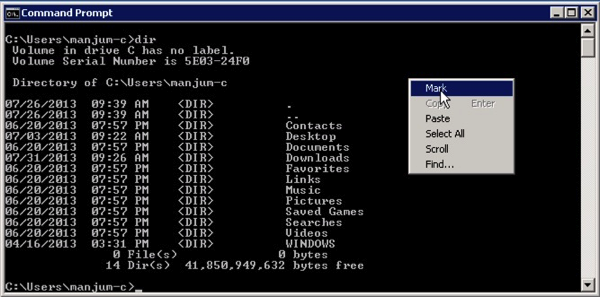
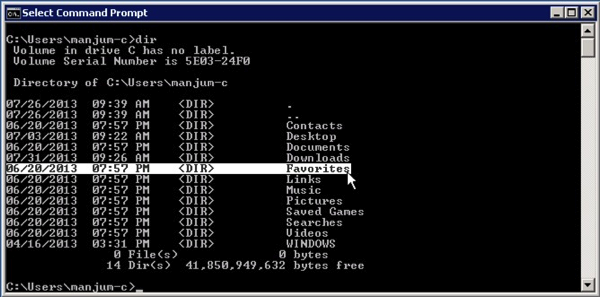
Select your "selection".
Hit "Enter" to copy.
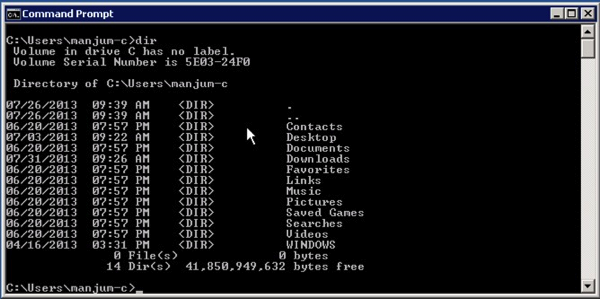
Proceed to Paste!
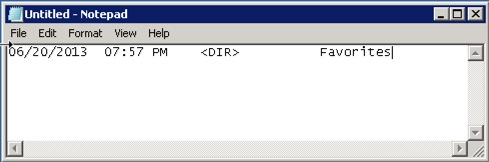
That's how I've done it until today :)
New School:
Do this once and you'll find your life with a few clicks each time…
Click on the Menu Button to the top left of the window.
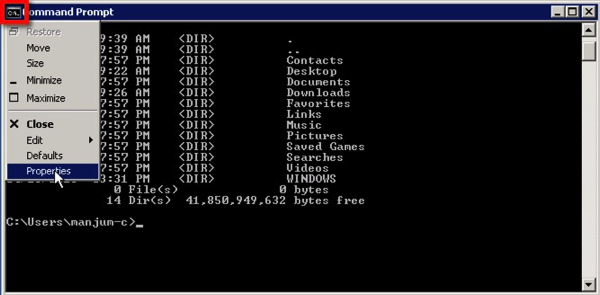
Click on "Properties".
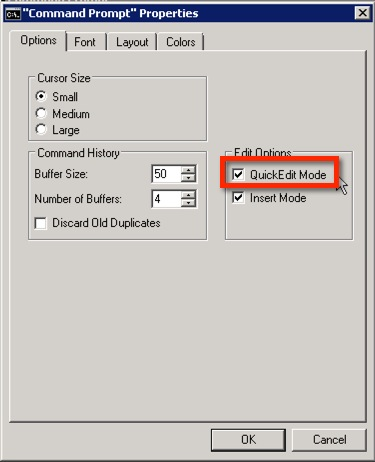
There's the magic option I never noticed or payed attention to...
Now, all you have to do is just click and select your "selection".
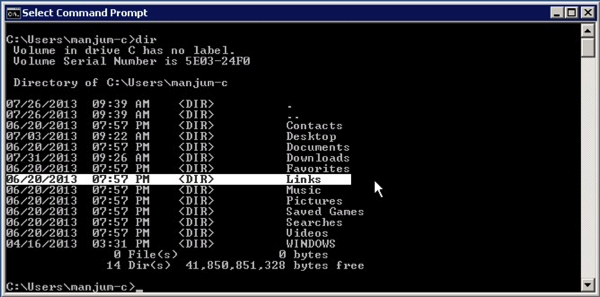
Hit "Enter" and paste away!
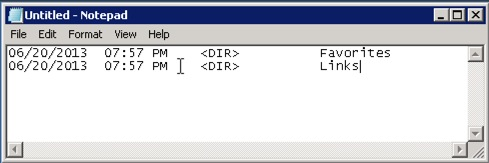
If you already knew this, please let me have this moment of joy. I'm very excited when I learn something new :)
Cheers!!
So, in the spirit of sharing and in my utter innocence and assumption that most of my readers are as clueless as I am, I'd like to share something new I learned about CMD.EXE :) A certain new friend of mine, whose name I will not mention except that his initials are NC, enlightened me today.
Often enough, we need to copy and paste content to and from cmd.exe windows but the process itself is, well, clunky!
Old School:
Right-Click and chose "Mark:
Select your "selection".
Hit "Enter" to copy.
Proceed to Paste!
That's how I've done it until today :)
New School:
Do this once and you'll find your life with a few clicks each time…
Click on the Menu Button to the top left of the window.
Click on "Properties".
There's the magic option I never noticed or payed attention to...
Now, all you have to do is just click and select your "selection".
Hit "Enter" and paste away!
If you already knew this, please let me have this moment of joy. I'm very excited when I learn something new :)
Cheers!!
Friday, August 2, 2013
An Alternative to Oracle Enterprise Managers GoldenGate Plugin
If you've arrived at this page then, most likely you're a victim of the JAGENT :) Not to be confused with Agent J.
I can't tell you how many times I've been burned by it when using it for OEM monitoring. The symptoms, if you care to read, include:
After banging my head against the wall with MOS, who told me that they're getting a lot reports from customers regarding JAGENTs, I decided to take things into my own hands. Fortunately, I am savvy enough with OEM and its Metric Extension architecture to build my own "plugin".
As a disclaimer to all perl guru's, the attached script is my first attempt at writing in the language. I consider myself quite humle and wide open to improvements and suggestions.
If you're like me, then you want to consolidate your work into concise folder. I chose the GoldenGate installation directory.
Copy monitor_gg.pl and ggsci_syntax.txt into this directory.
The key parameters to consider are at the beginning of the script.
Reset the directory variables to your respective environment (by the way, the script works on Windows as well as long as you point it to perl binaries).
Give it a test to make sure that it works. My output looks is the following:
It is concatenating the strings to represet the current object type, status, lag at checkpoint (seconds), and time since last check point (seconds) values.
Here on, you simply need to create a Metric Extension (for a Host Target Type) within OEM and configure your incident rule sets accordingly. If I had more time, I would show you how I set up mine but I didn't capture any screenshots. The documentation for it pretty straightforward and the GUI itself is intuitive.
On my "All Metrics" for the host, I see the following:

There's plenty to improve on in the script. Since I have an active ticket with Oracle Support, unless they come back with a solution quickly, I will continue to improve on the attached script.
Hope this was helpful for at least some of you :)
I can't tell you how many times I've been burned by it when using it for OEM monitoring. The symptoms, if you care to read, include:
- Hanging Extract and Pumps
- BDB datastore corruptions
The solution, most times, to the above problems was to either rebuild the datastore or remove the JAGENT completely.
After banging my head against the wall with MOS, who told me that they're getting a lot reports from customers regarding JAGENTs, I decided to take things into my own hands. Fortunately, I am savvy enough with OEM and its Metric Extension architecture to build my own "plugin".
As a disclaimer to all perl guru's, the attached script is my first attempt at writing in the language. I consider myself quite humle and wide open to improvements and suggestions.
If you're like me, then you want to consolidate your work into concise folder. I chose the GoldenGate installation directory.
Copy monitor_gg.pl and ggsci_syntax.txt into this directory.
The key parameters to consider are at the beginning of the script.
Reset the directory variables to your respective environment (by the way, the script works on Windows as well as long as you point it to perl binaries).
Give it a test to make sure that it works. My output looks is the following:
It is concatenating the strings to represet the current object type, status, lag at checkpoint (seconds), and time since last check point (seconds) values.
Here on, you simply need to create a Metric Extension (for a Host Target Type) within OEM and configure your incident rule sets accordingly. If I had more time, I would show you how I set up mine but I didn't capture any screenshots. The documentation for it pretty straightforward and the GUI itself is intuitive.
On my "All Metrics" for the host, I see the following:

There's plenty to improve on in the script. Since I have an active ticket with Oracle Support, unless they come back with a solution quickly, I will continue to improve on the attached script.
Hope this was helpful for at least some of you :)
Sunday, July 21, 2013
Oracle Enterprise Manager 12c: Unable to Login using SYSMAN after unsuccessful Upgrade
After an incomplete attempt to upgrade OEM 12.1.0.2.0 to
12.1.0.3.0, a few days later I received a call from my client that the sysman
password is not working. Interesting.
We validated the sysman account from the database and it was
correct. The issue was on the WebLogic layer.
So, what changed? According to the customer, their Systems
Administrators applied OS Security Patches during the weekend.
Other than that, the one apparent thing you need to do as
part of the pre-upgrade steps is to copy the emkey to the repository. Did I
remove it?
D:\>D:\oracle\app\product\12.1.0\middleware1\oms\bin\emctl
status emkey
Oracle Enterprise Manager Cloud Control 12c
Release 2
Copyright (c) 1996, 2012 Oracle Corporation. All rights reserved.
Enter Enterprise Manager Root (SYSMAN) Password :
The EMKey
is configured properly, but is not secure. Secure the EMKey by running
"emctl config emkey -remove_from_repos".
|
Apparently not :)
D:\>emctl config emkey -remove_from_repos
Oracle Enterprise Manager Cloud Control 12c
Release 2
Copyright (c) 1996, 2012 Oracle Corporation. All rights reserved.
Enter Enterprise Manager Root (SYSMAN) Password :
The EMKey has been removed from the Management
Repository.
|
So, I removed it.
D:\>D:\oracle\app\product\12.1.0\middleware1\oms\bin\emctl
status emkey
Oracle Enterprise Manager Cloud Control 12c
Release 2
Copyright (c) 1996, 2012 Oracle Corporation. All rights reserved.
Enter Enterprise Manager Root (SYSMAN) Password :
The EMKey is configured properly.
D:\>D:\oracle\app\product\12.1.0\middleware1\oms\bin\emctl
stop oms
Oracle Enterprise Manager Cloud Control 12c
Release 2
Copyright (c) 1996, 2012 Oracle Corporation. All rights reserved.
Stopping WebTier...
WebTier Successfully Stopped
Stopping Oracle Management Server...
Oracle Management Server Successfully Stopped
Oracle Management Server is Down
|
Hmm, no luck. OEM is refusing to let me login as SYSMAN via
the console.
D:\>D:\oracle\app\product\12.1.0\middleware1\oms\bin\emctl
config oms -change_repos_pwd -use_sys_pwd -sys_pwd mycurrentsecret -new_pwd
mynewsecret
Oracle Enterprise Manager Cloud Control 12c
Release 2
Copyright (c) 1996, 2012 Oracle Corporation. All rights reserved.
Changing passwords in backend ...
Passwords changed in backend successfully.
Updating repository password in Credential
Store...
Successfully updated Repository password in
Credential Store.
Restart all the OMSs using 'emctl stop oms -all'
and 'emctl start oms'.
Successfully changed repository password.
|
Restart.
D:\>D:\oracle\app\product\12.1.0\middleware1\oms\bin\emctl
stop oms -all
Oracle Enterprise Manager Cloud Control 12c
Release 2
Copyright (c) 1996, 2012 Oracle Corporation. All rights reserved.
Stopping WebTier...
WebTier Successfully Stopped
Stopping Oracle Management Server...
Oracle Management Server Already Stopped
AdminServer Successfully Stopped
Oracle Management Server is Down
D:\>D:\oracle\app\product\12.1.0\middleware1\oms\bin\emctl
start oms
Oracle Enterprise Manager Cloud Control 12c
Release 2
Copyright (c) 1996, 2012 Oracle Corporation. All rights reserved.
Windows service OracleManagementServer_EMGC_OMS1_1
successfully started
Oracle Management Server is Up
D:\>D:\oracle\app\product\12.1.0\middleware1\oms\bin\emctl
status oms -details
Oracle Enterprise Manager Cloud Control 12c
Release 2
Copyright (c) 1996, 2012 Oracle Corporation. All rights reserved.
Enter Enterprise Manager Root (SYSMAN) Password :
Console Server Host : oem.server.mine
HTTP Console Port : 7789
HTTPS Console Port : 7800
HTTP Upload Port : 4890
HTTPS Upload Port : 4899
EM Instance Home :
D:\oracle\app\product\12.1.0\middleware1\gc_inst\em\EMGC_OMS1
OMS Log Directory Location :
D:\oracle\app\product\12.1.0\middleware1\gc_inst\em\EMGC_OMS1/sysman/log
OMS is not configured with SLB or virtual hostname
Agent Upload is locked.
OMS Console is locked.
Active CA ID: 1
Console URL: https:// oem.server.mine:7800/em
Upload URL: https:// oem.server.mine:4899/empbs/upload
WLS Domain Information
Domain Name
: GCDomain
Admin Server Host: oem.server.mine
Managed Server Information
Managed Server Instance Name: EMGC_OMS1
Managed Server Instance Host: oem.server.mine
WebTier is Up
Oracle Management Server is Up
|
And yet, I still couldn't successfully log into OEM. Think
man, think: What else did you change??
Then I remembered this screen pop during the upgrade.

Okay, let’s check the repository.
D:\>%ORACLE_HOME%\bin\sqlplus / as sysdba
SQL*Plus: Release 11.2.0.1.0 Production on Sun Jul
21 15:26:30 2013
Copyright (c) 1982, 2010, Oracle. All rights reserved.
Connected to:
Oracle Database 11g Enterprise Edition Release
11.2.0.1.0 - 64bit Production
With the Partitioning, OLAP, Data Mining and Real
Application Testing options
SQL> show parameter job
NAME TYPE VALUE
------------------------------------ -----------
------------------------------
job_queue_processes integer 0
|
Idiot! Go and change it back to its original value!
SQL> alter system set job_queue_processes=1000;
System altered.
SQL> show parameter job
NAME TYPE VALUE
------------------------------------ -----------
------------------------------
job_queue_processes integer 1000
|
Restart OMS.
And magically, I’m now able to log into OEM using the SYSMAN
password.
Subscribe to:
Posts
(
Atom
)