Wednesday, February 26, 2014
Set oraInventory for EM12c Agents during GUI Installation
So, this is a peculiar problem that I had to dig to find a solution for; each time I deployed an agent to Add Targets to EM12c where no other Oracle Software was located, it would always created the oraInventory located under the $HOME directory. In my case, /home/oracle/oraInventory. This is quite annoying because for subsequent Oracle Software installs, this incorrect location is always chosen. Instead, I want it to go the, lets say /u01/oracle/oraInventory.
I knew there must be a way to get around this, and after digging in MOS and Oracle Docs, I found the section below. Documentation 9.4.1 section i.

To further expand on the documentation, there’s a couple of sections which describe the usage.
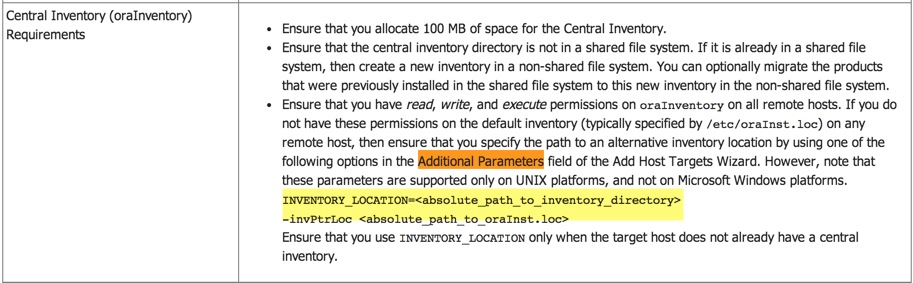
Looking at Table 9-2.

I had to give this one a try! So, after you get to the Add Targets home page, enter the Host Name(s) and find the section at the bottom for “Additional Parameters”. Simply put this section in it INVENTORY_LOCATION=/u01/oracle/oraInventory.
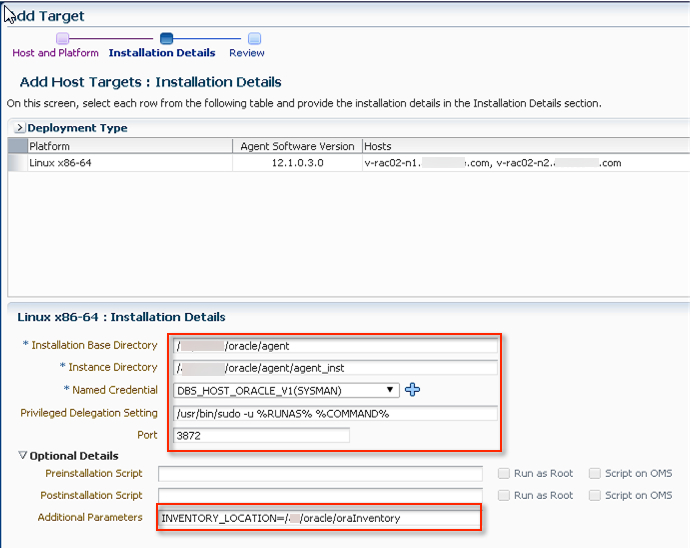
Proceed with the rest of the installation steps, and at its completion check the host(s) folders.

So, at the end of the day I have to give credit to the amazing documentation Oracle has put together for OEM. You just need to know what you want, then ask the right question.
Hope this helps!
Cheers.
Wednesday, August 7, 2013
Oracle Enterprise Manager 12c Windows Agent Deployments Made Easy
The alternative, via Silent Install, is illustrated by my good friend Bobby Curtis here. However, for large scale quicker deployments, I came up with an a solution which worked quite well.
Assuming you have already download the agent binaries from the OMS server, copy them to a centralized location accessible to all target hosts. In my case, I used \\slave\software\oracle\oem\12.1.0.3.0\agent
The important thing here is the content of the agent.rsp file. Mine looks like this. I did not keep the ORACLE_HOSTNAME parameter within the response file (agent.rsp)
####################################################################
## copyright (c) 1999, 2012 Oracle. All rights reserved. ##
## ##
## Specify values for the variables listed below to customize ##
## your installation. ##
## ##
## Each variable is associated with a comment. The comment ##
## identifies the variable type. ##
## ##
## Please specify the values in the following format: ##
## ##
## Type Example ##
## String "Sample Value" ##
## Boolean True or False ##
## Number 1000 ##
## StringList {"String value 1","String Value 2"} ##
## ##
## The values that are given as  need to be ##
## specified for a silent installation to be successful. ##
## ##
## ##
## This response file is generated by Oracle Software ##
## Packager. ##
###################################################################

RESPONSEFILE_VERSION=2.2.1.0.0

#-------------------------------------------------------------------------------
#OMS_HOST: OMS host info required to connect to OMS
#EM_UPLOAD_PORT: OMS port info required to connect to OMS
#AGENT_REGISTRATION_PASSWORD: Agent Registration Password needed to
# establish a secure connection to the OMS.
#AGENT_INSTANCE_HOME: Agent instance home is the location of agent state directory.
#AGENT_PORT: Agent port on which the agent process should be started.
#b_startAgent: Agent will not be started after configuration if the value specified is false.
#ORACLE_HOSTNAME: Fully qualified domain name of host where is the agent is deployed.
#s_agentHomeName:Customized Oracle home name for the agent home. Example: s_agentHomeName="agent12gR1"
#-------------------------------------------------------------------------------
OMS_HOST=cruiser.missile.com
EM_UPLOAD_PORT=4899
AGENT_REGISTRATION_PASSWORD=you_havent_changed_the_sysman_password
AGENT_INSTANCE_HOME=D:\oracle\app\product\12.1\agent
AGENT_PORT=3875
b_startAgent=true
s_agentHomeName=agent12c_home1
#-------------------------------------------------------------------------------
#s_agentServiceName: Sets the agent Service Name and this variable can be
# used to overrite the agent service name calculated by the install. This is
# required for only Windows.
# Example:
# s_agentServiceName = "Oracleagent12gAgent" ; default value
# s_agentServiceName = "GridAgent" ; User specified value
#-------------------------------------------------------------------------------
s_agentServiceName="Oracleagent12cAgent"

####################################################################################
#Please Don't change the values of these variables
####################################################################################
#-------------------------------------------------------------------------------
#EM_INSTALL_TYPE: install type
#-------------------------------------------------------------------------------
EM_INSTALL_TYPE="AGENT"
c:\> view DeployTheAgent.bat
\\slave\software\oracle\oem\12.1.0.3.0\agent\agentDeploy.bat AGENT_BASE_DIR=D:\Oracle\app\product\12.1 RESPONSE_FILE=\\slave\software\oracle\oem\12.1.0.3.0\agent\agent.rsp ORACLE_HOSTNAME=%COMPUTERNAME%.%USERDNSDOMAIN%
$ cat
DeployTheAgent.sh
\\slave\software\oracle\oem\12.1.0.3.0\agent\agentDeploy.sh AGENT_BASE_DIR=/u01/app/oracle/product/12.1 RESPONSE_FILE=<path to mounted drive>\<agent software directory>\agent.rsp ORACLE_HOSTNAME=hostname.domainname
c:\>\\slave\software\oracle\oem\12.1.0.3.0\agent\DeployTheAgent.bat
\\slave\software\oracle\oem\12.1.0.3.0\agent\agentDeploy.bat AGENT_BASE_DIR=D:\Oracle\app\product\12.1 RESPONSE_FILE=\\slave\software\oracle\oem\12.1.0.3.0\agent\agent.rsp ORACLE_HOSTNAME=javelin.missile.com
\\slave\software\oracle\oem\12.1.0.3.0\agent
Present working directory:\\slave\software\oracle\oem\12.1.0.3.0\agent
Archive location:\\slave\software\oracle\oem\12.1.0.3.0\agent directory
AGENT_BASE_DIR
AGENT_BASE_DIR
D:\Oracle\app\product\12.1
Agent base directory:D:\Oracle\app\product\12.1
D:\Oracle\app\product\12.1
RESPONSE_FILE
\\slave\software\oracle\oem\12.1.0.3.0\agent\agent.rspORACLE_HOSTNAME
javelin.missile.com
Agent base directory:D:\Oracle\app\product\12.1
OMS Host:
Agent image loc : "\\slave\software\oracle\oem\12.1.0.3.0\agent"
D:\Oracle\app\product\12.1 configonlyfalse
Reading the properties file: "\\slave\software\oracle\oem\12.1.0.3.0\agent"\agentimage.properties
1 file(s) copied.
This is the version 12.1.0.2.0
This is the type core
This is the aru id 233
So, for any new target host, simply invoke the DeployAgent.bat or DeployAgent.sh script and relax! Assuming that your paths are correct and, network ports are accessible, the installation should go through without any glitches.
Reference:
Oracle Documentation: Installing Oracle Management Agent in Silent Mode